All work
Case study · Agritech ERP · In production since April 2026

The nursery that outgrew its spreadsheets — and what runs it now.

Aruj Nursery is North India's first grafted-vegetable nursery, shipping lakhs of seedlings a season to farmers across ten states. Orders, dispatch, seed, money and people now run through one system — built and shipped by one engineer.

Client
Aruj Nursery
Agritech ERP
Location
Solan, Himachal Pradesh
In production since
Live since April 2026
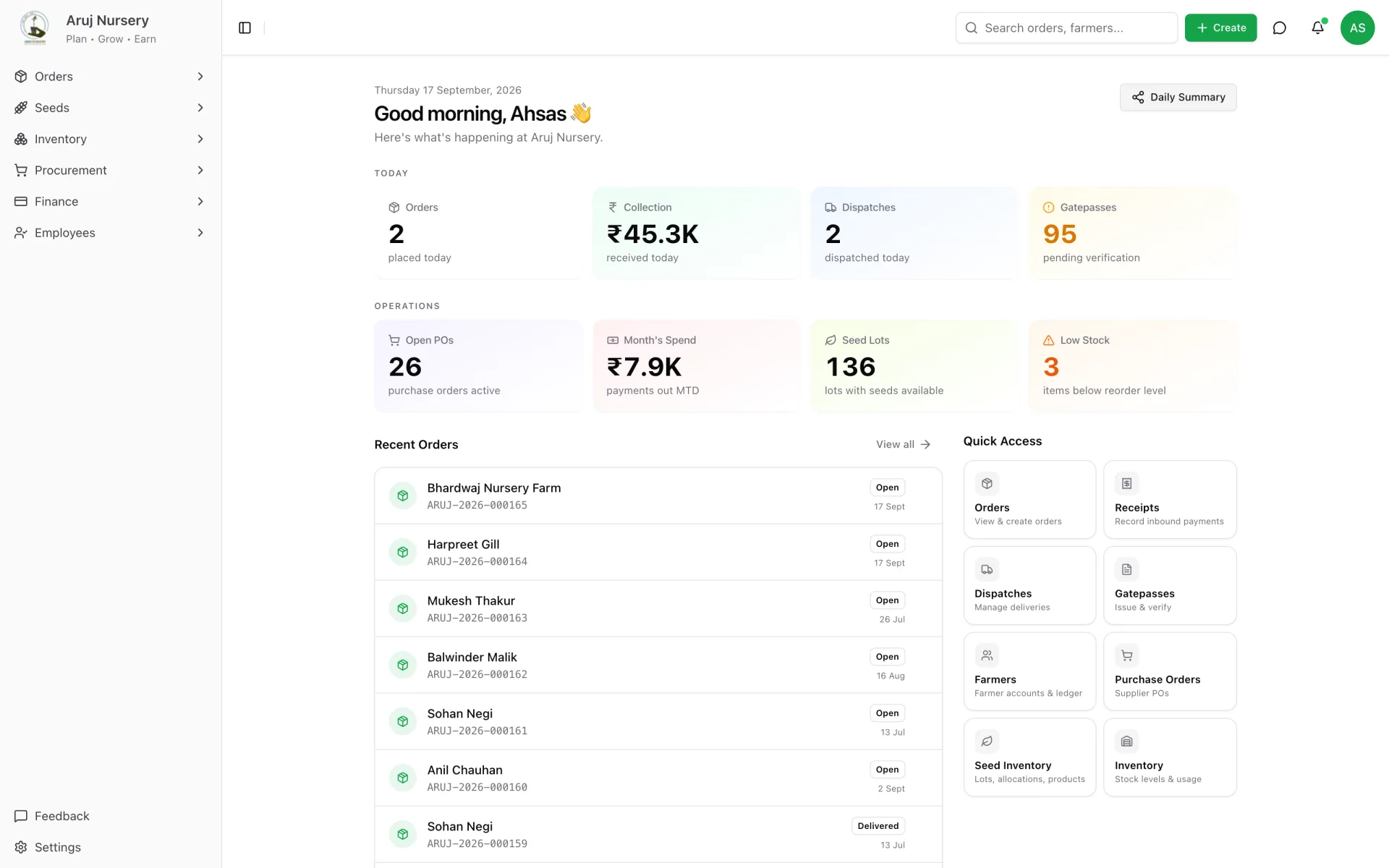
The home screen — today's orders, collection, dispatches and gatepasses, plus what needs attention.
Through the system since April 2026

Through the system since go-live in April 2026. The rollout is still expanding module by module, so these are a floor, not the size of the business.

277
Farmer accounts
across 65 districts in 10 states
3.8 lakh+
Plants ordered
509 order lines
₹46 lakh+
Collected & reconciled
249 receipts, every rupee allocated
142
Gatepasses released
139 vehicle trips
4,800+
Audited events
every change, who and when
The business behind the screens

A grafted-vegetable nursery, at scale.

Aruj grafts vegetable scions — tomato, capsicum, brinjal, cucumber — onto disease-resistant rootstock under polyhouses in Solan, Himachal Pradesh, and delivers hardened seedlings by the crate to farmers across North India. Every tray on these benches is an order line, a seed lot and a farmer account somewhere in the system.

  • ▲ North India's first grafted-vegetable nursery
  • ▲ farmers in 65 districts across 10 states
  • ▲ seed, sowing, grafting, hardening, dispatch — one site
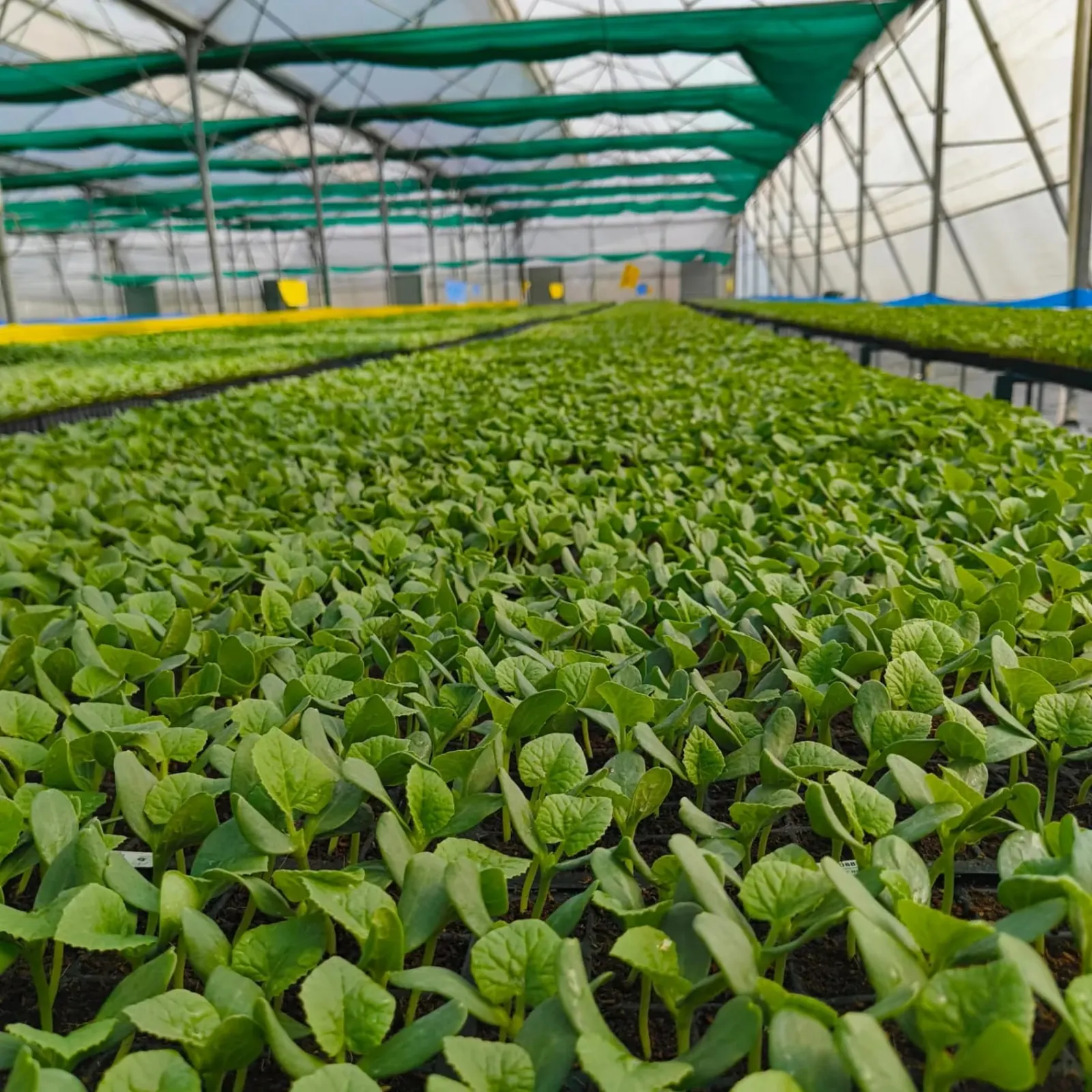
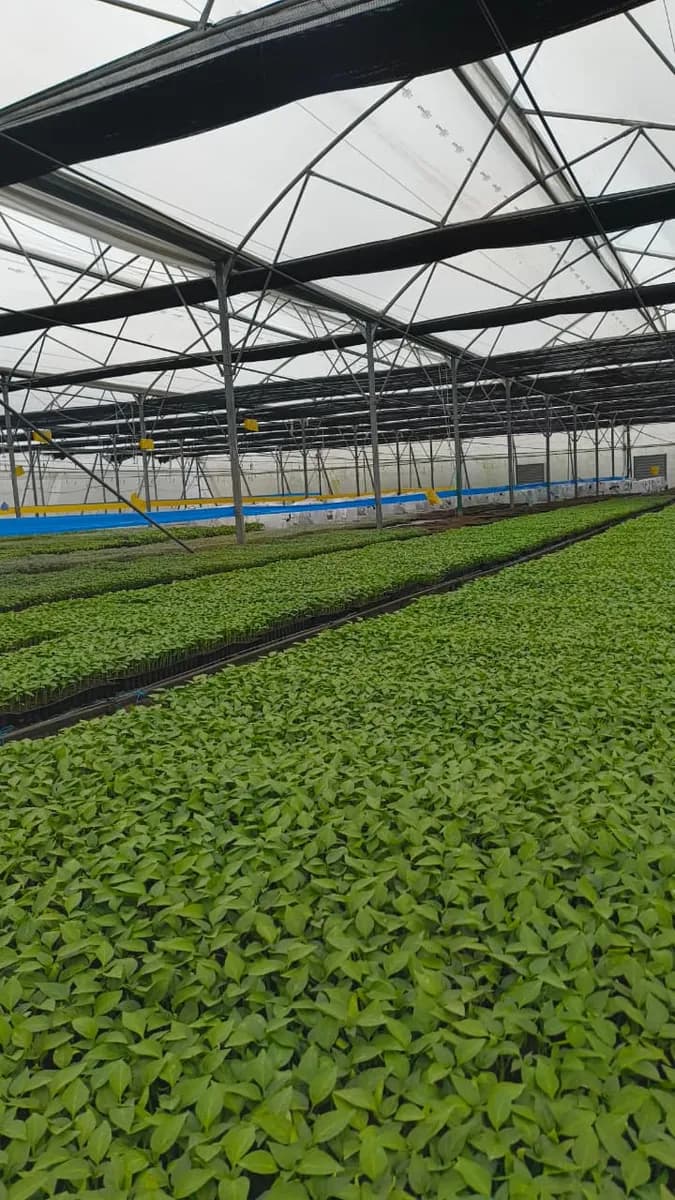
Rows of seedling trays under a polyhouse roof
The polyhouse
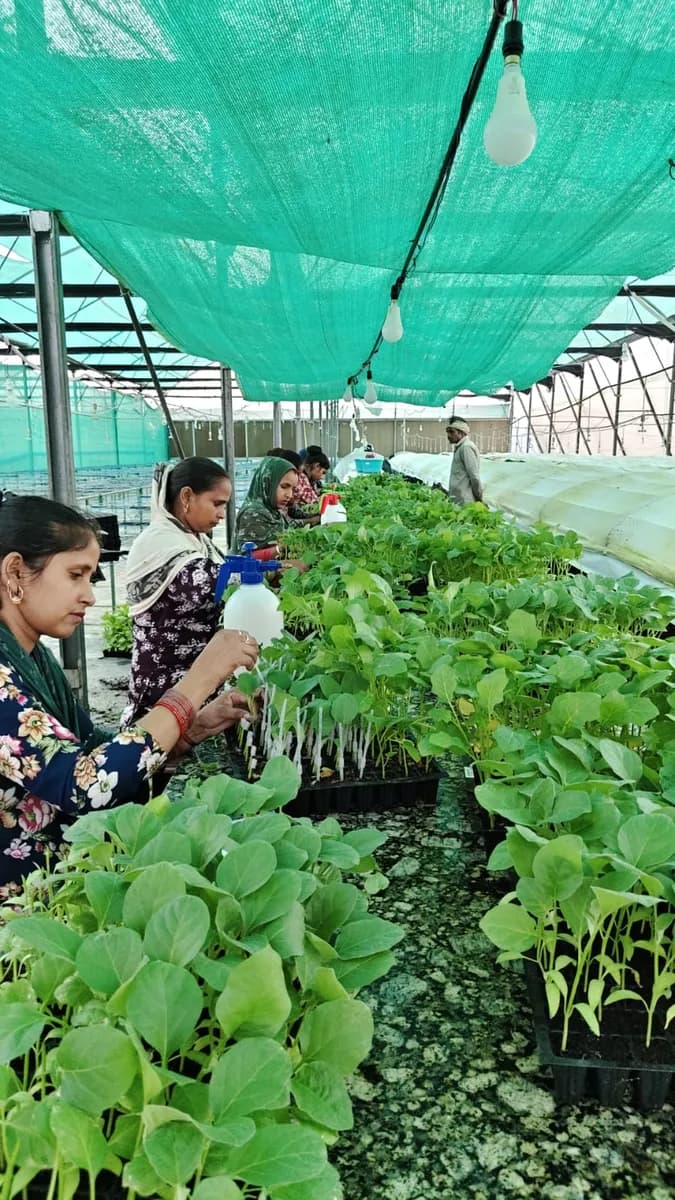
Nursery staff grafting seedlings at a bench under green shade net
The grafting bench
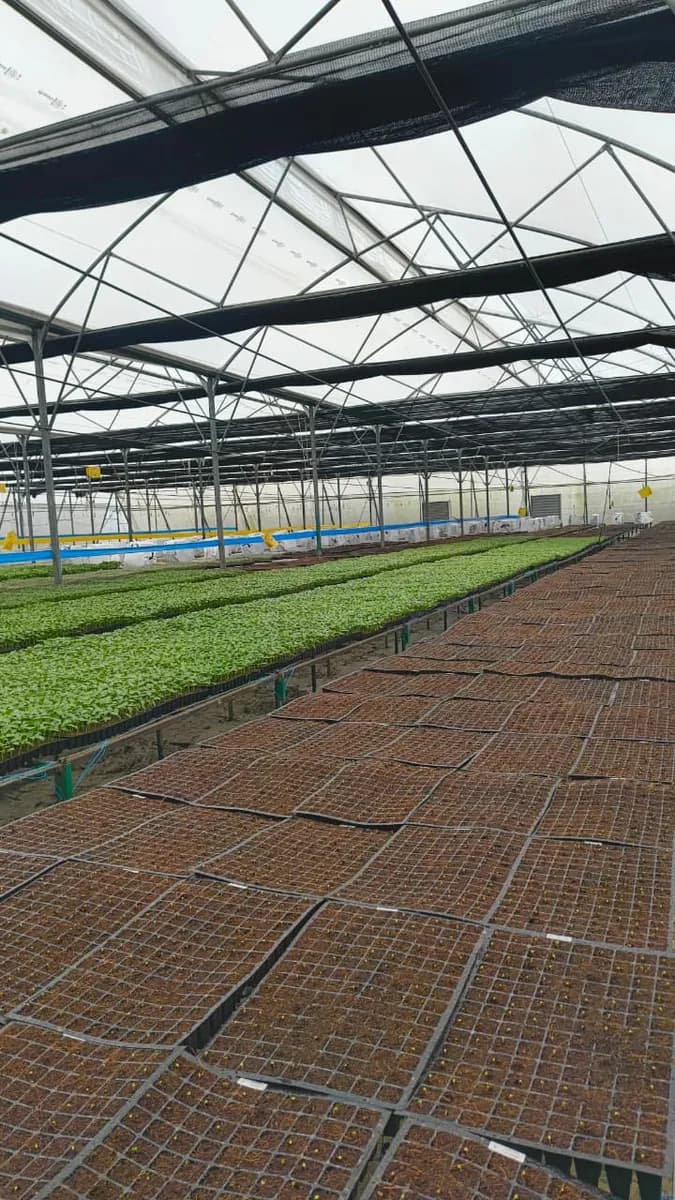
Freshly sown seedling trays in the foreground, germinated rows behind
Sown, then germinated
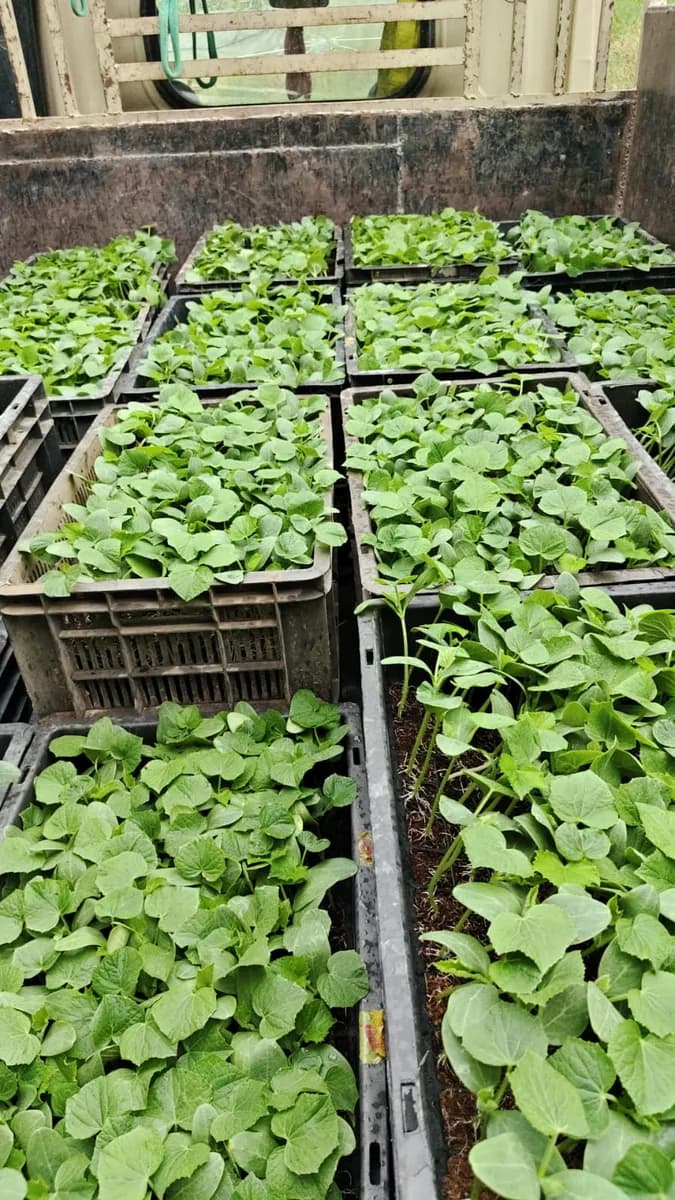
Crates of seedlings loaded in the back of a truck
Out of the gate

If any of this sounds like your week, keep reading.

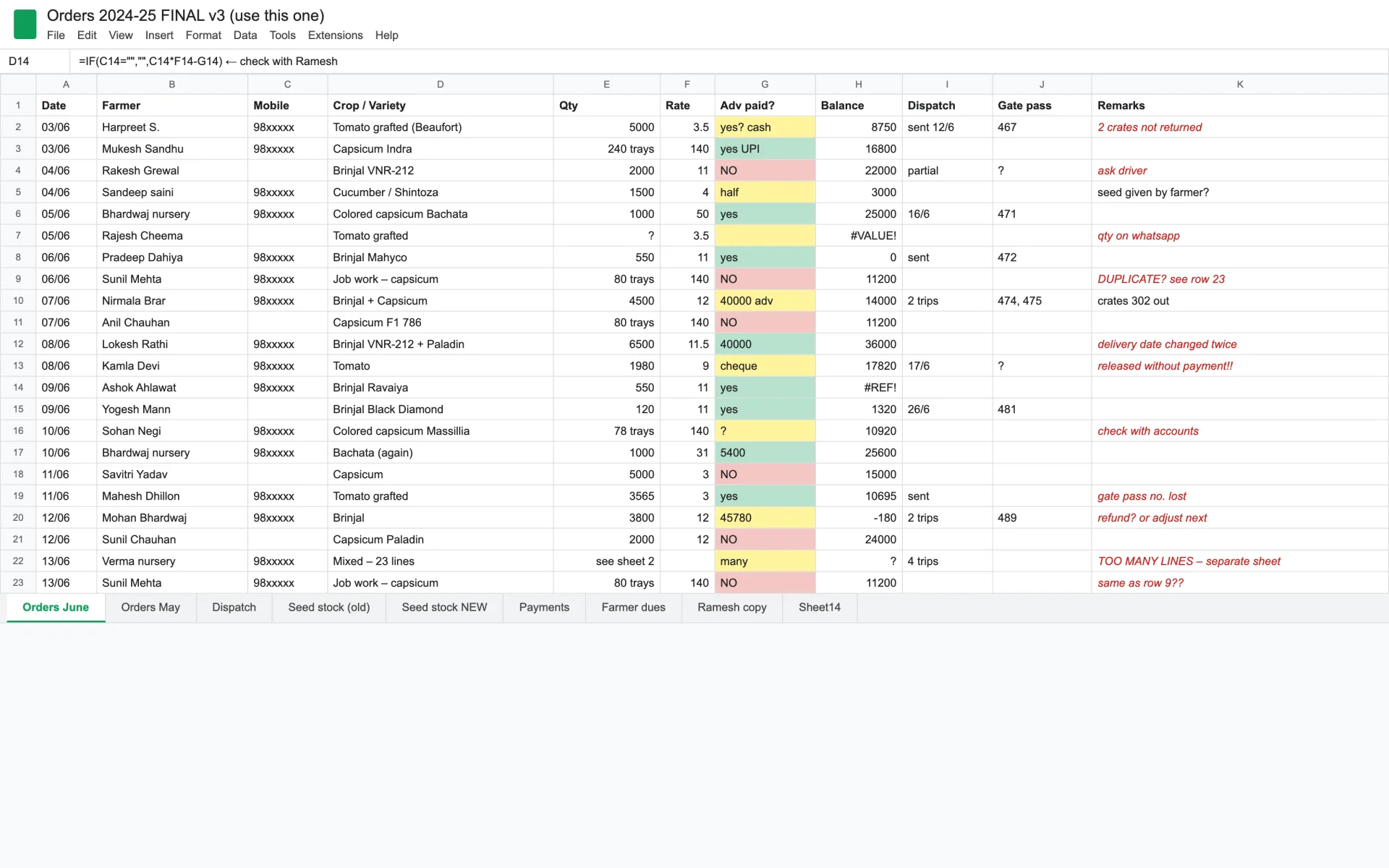
Orders in one sheet, dispatch in another, dues in someone's head.

Answering "what does this farmer still owe?" meant opening three files, a WhatsApp thread and a notebook — and trusting that all four agreed.

Plants left the gate before the money was checked.

A gate pass was a slip of paper. Nobody at the gate could see the balance, so the balance was chased weeks later, by phone, from memory.

Seed arrived, got sown, and nobody could say which lot went where.

Farmer-supplied seed, purchased seed and germination results lived on packets and in heads. A poor batch was found in the field, not in the store.

Before / after

The order sheet, and what it became.

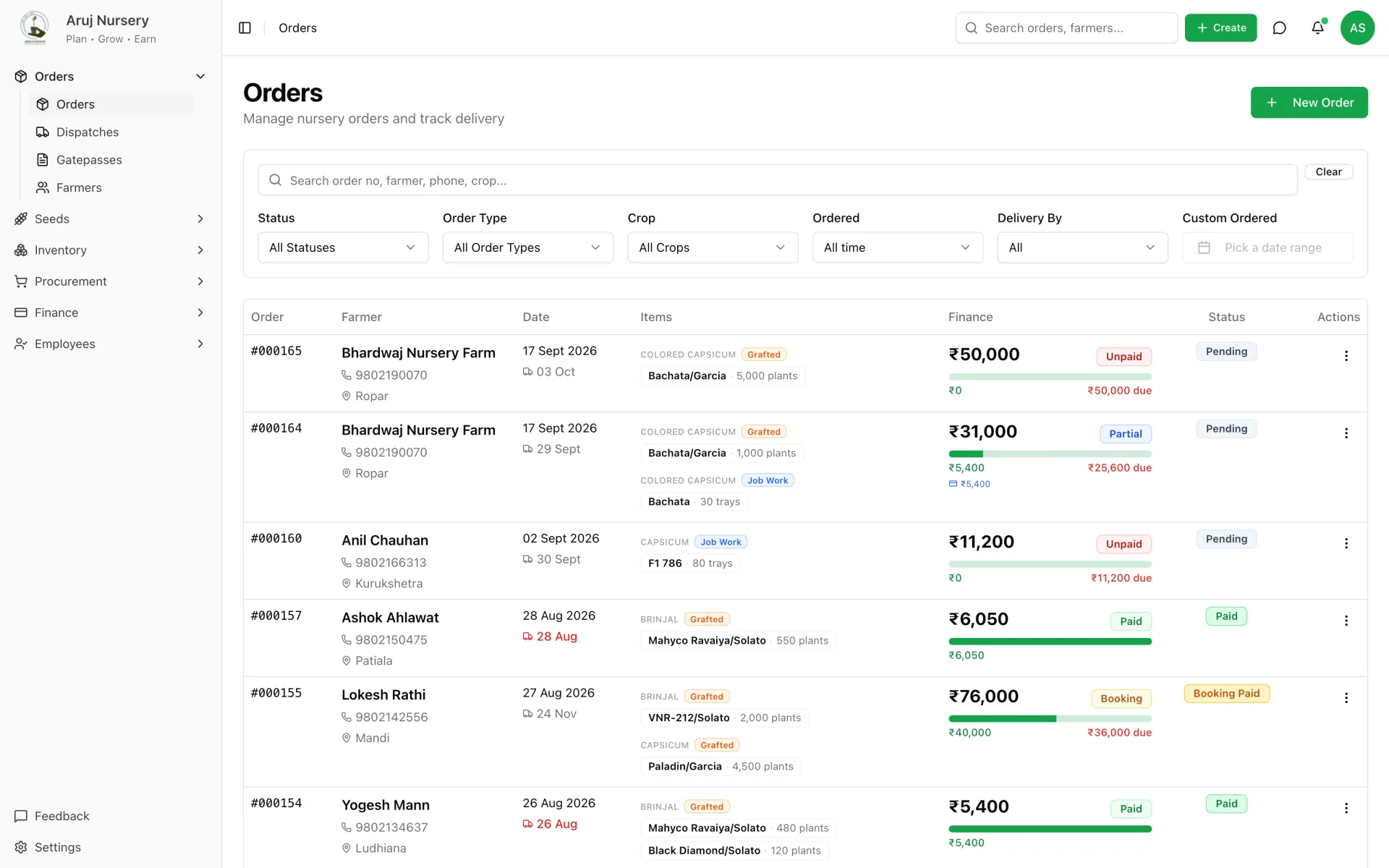
The left panel is a representative reconstruction of the kind of sheet the nursery ran on — the real ones are the client's. The right panel is the live system, with names changed.

The spreadsheetbefore
Representative: one order sheet of fourteen tabs. Duplicate rows, #REF! balances, a gate pass released without payment.
The systemafter
After: every order with its lines, live payment bar, delivery date and status — searchable, filterable, one screen.

Same business. Same process. Different Tuesday.

One order, end to end

Follow a single order from booking to settled account.

The fastest way to see the scope is to watch one farmer's order move through the nursery. Every step below is a real screen, on real workflows, with the names changed.

  1. STEP 01

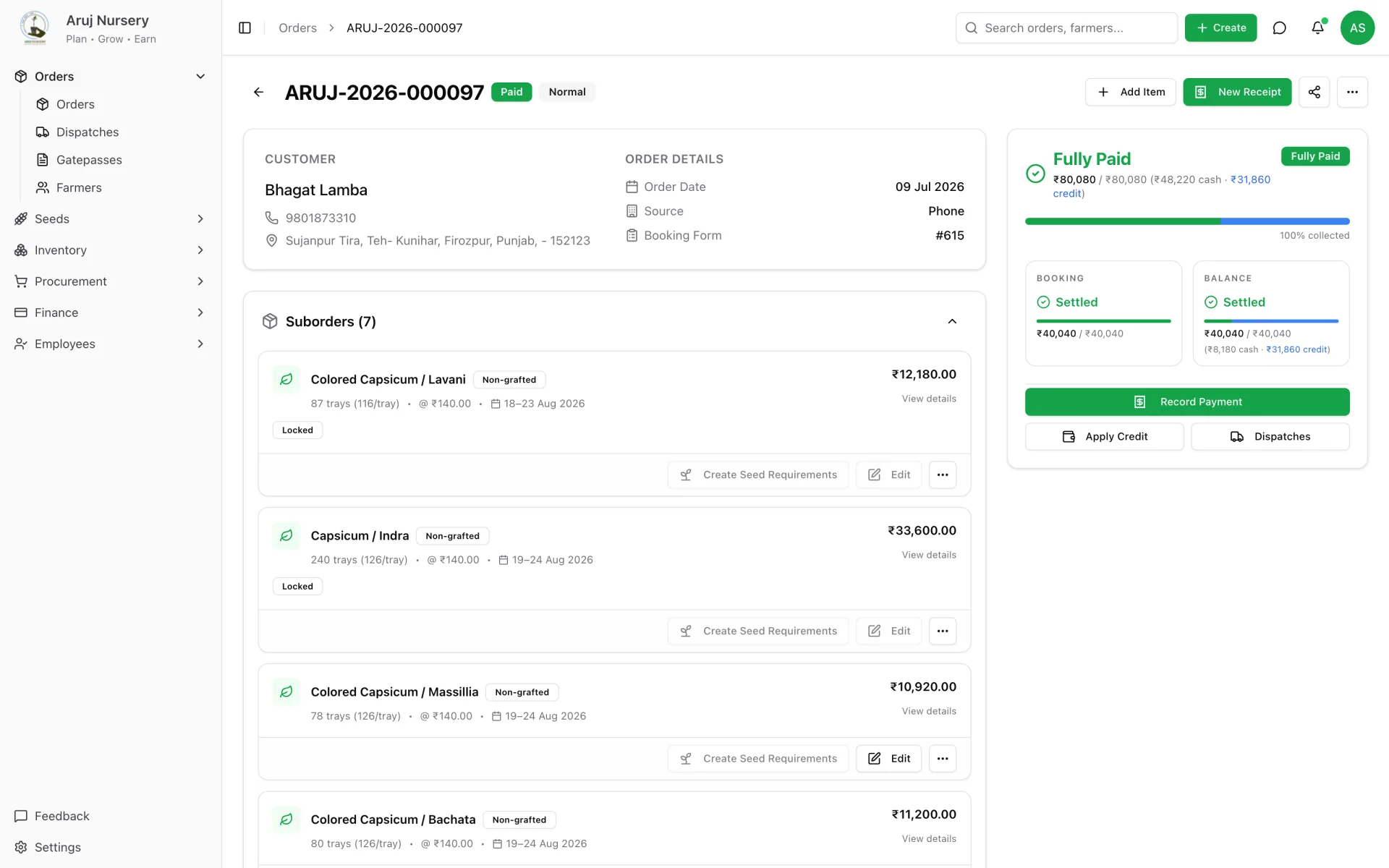
    The order is booked — with its own money rules.

    Each line carries a crop, a variety, a rootstock for grafted plants, a quantity, a rate and a delivery date. The total splits into a booking amount and a balance, so everyone knows what must be paid before the nursery commits seed.

    Order detail — lines, booking and balance buckets, payment state, and every action in one place.
    Order detail — lines, booking and balance buckets, payment state, and every action in one place.
  2. STEP 02

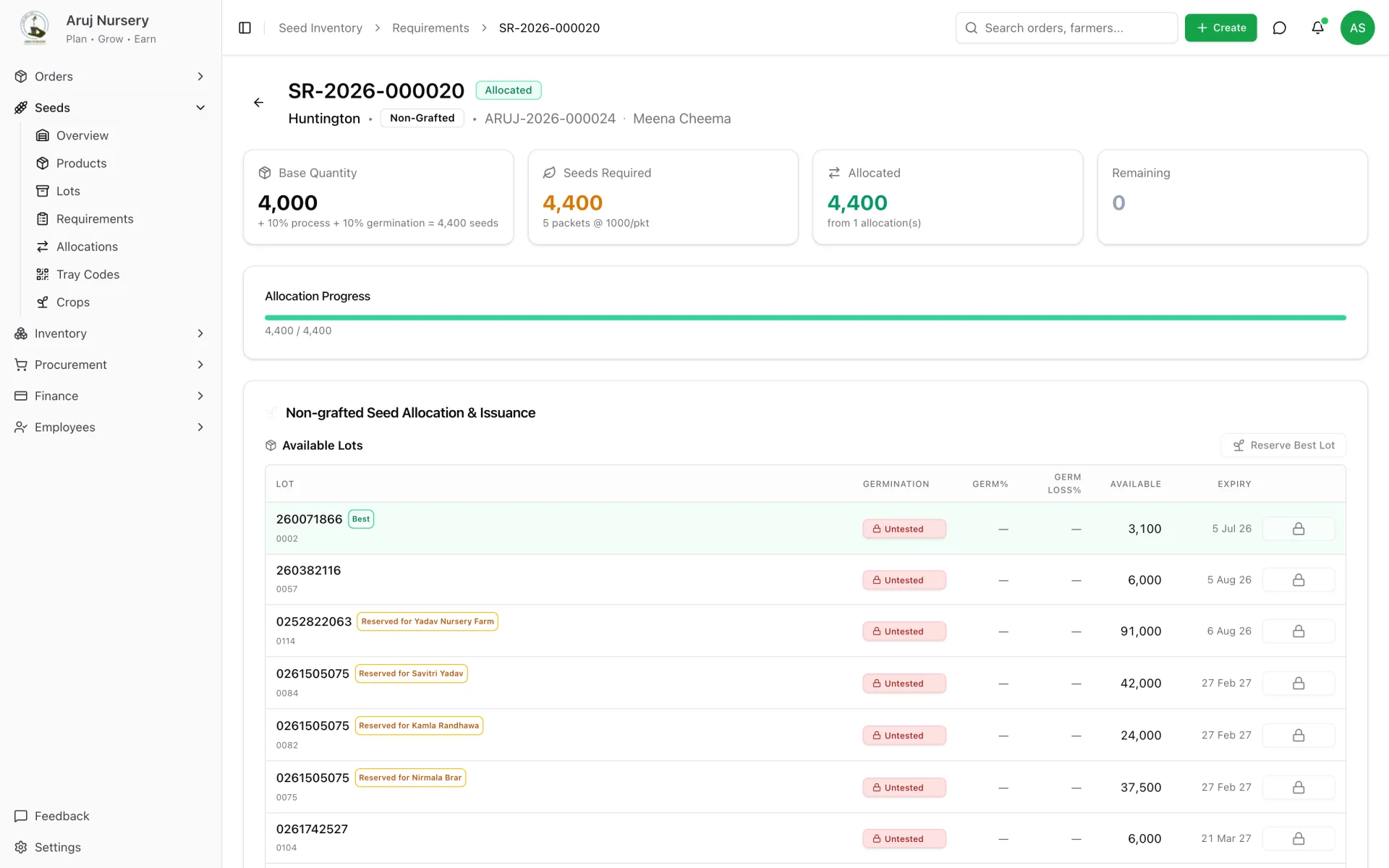
    Seed is reserved from a specific lot.

    The order generates a seed requirement — quantity × tray size × seeds per cell × a wastage factor. Stock is allocated from tested lots first; untested seed stays locked until a germination result is recorded.

    Seed requirement — 4,000 plants become 4,400 seeds, reserved against the best available lot.
    Seed requirement — 4,000 plants become 4,400 seeds, reserved against the best available lot.
  3. STEP 03

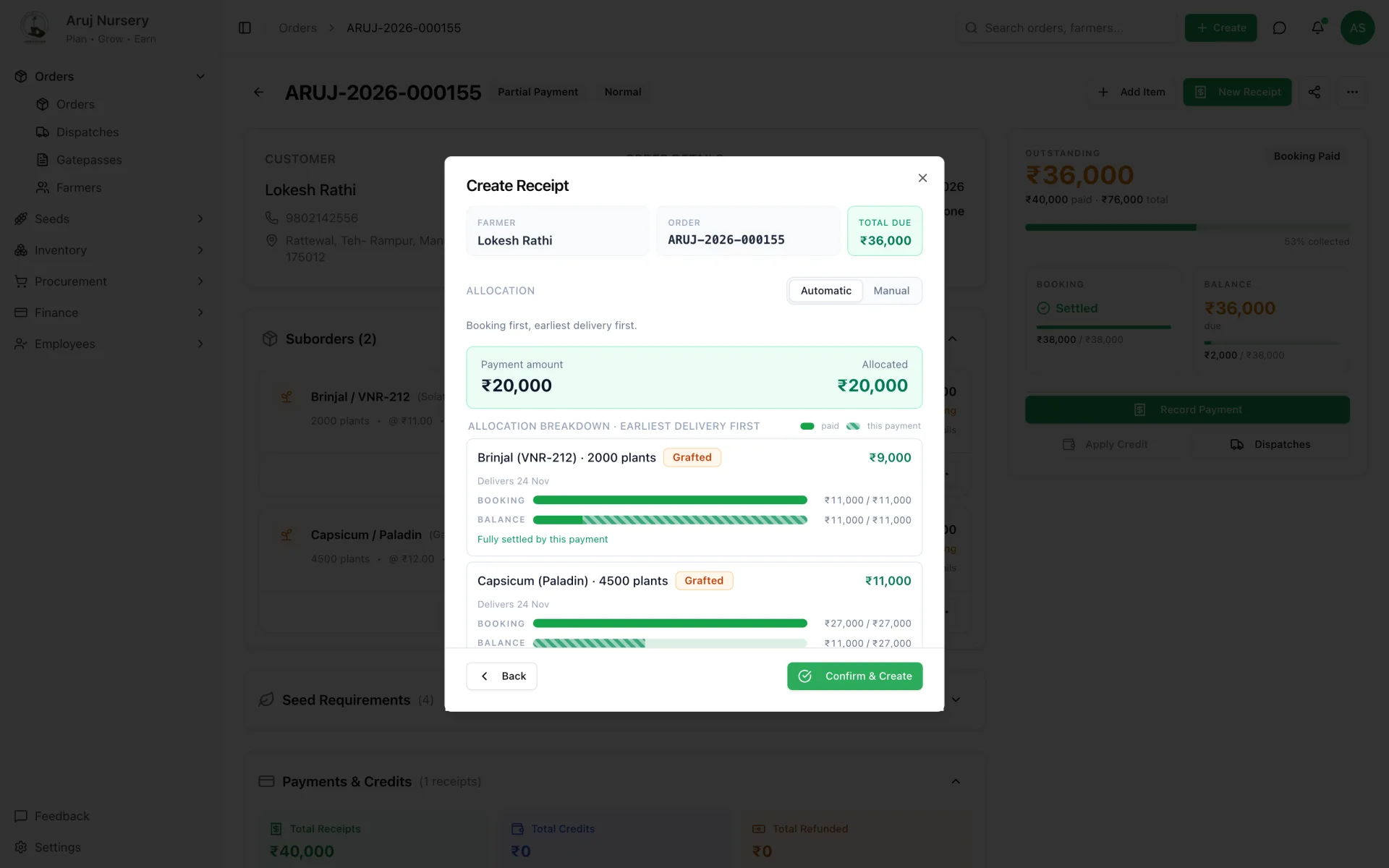
    A payment arrives and allocates itself.

    Record the receipt once. The system fills the booking of every line first, earliest delivery first, then balances. Whatever is left over becomes a credit on the farmer's account — automatically, never lost.

    Receipt allocation preview — booking first, earliest delivery first, before anyone clicks confirm.
    Receipt allocation preview — booking first, earliest delivery first, before anyone clicks confirm.
  4. STEP 04

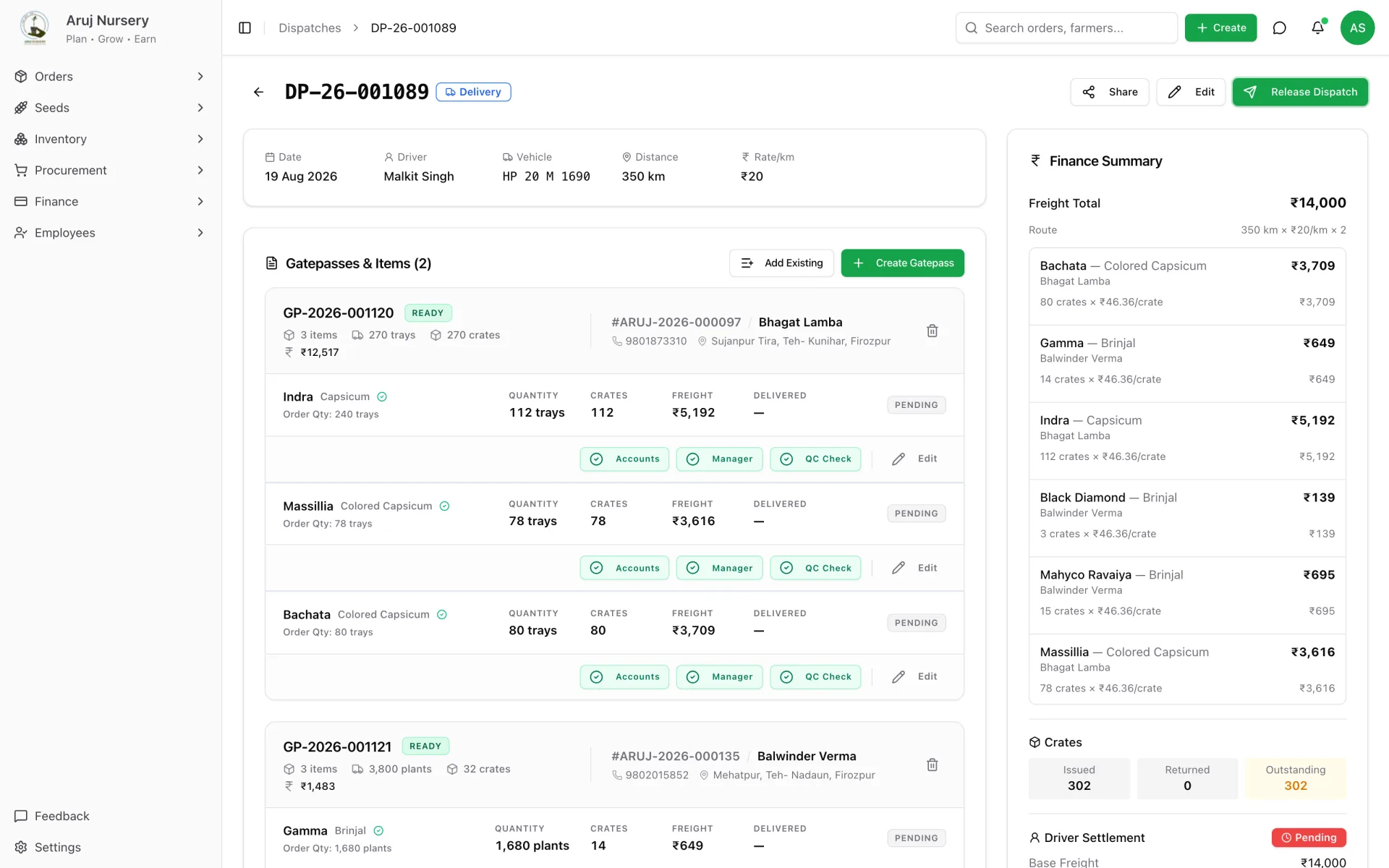
    A vehicle trip is planned with its freight.

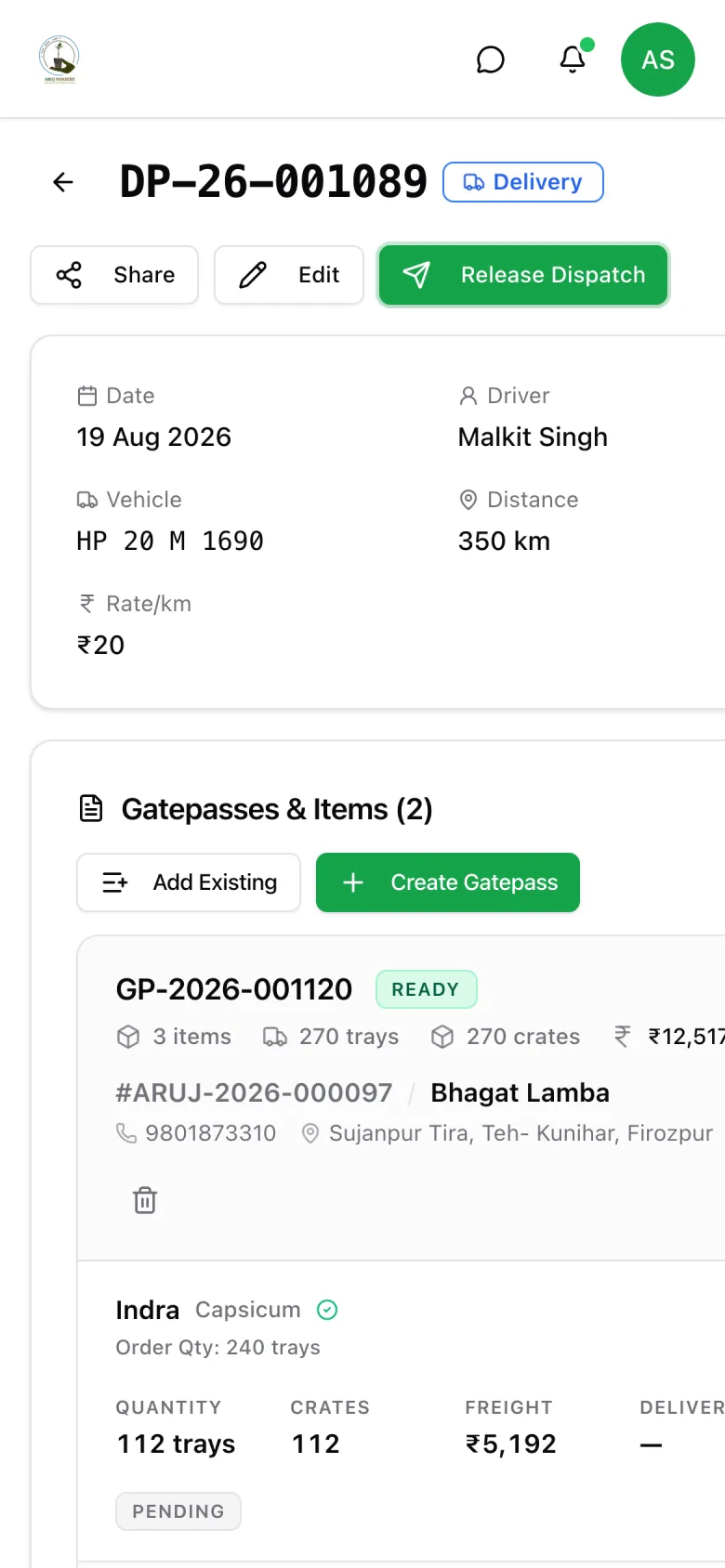
    One dispatch is one trip. Lines from several orders can share it; freight is computed from distance and split per crate; crates issued and returned are tracked; the driver's settlement is worked out on the same screen.

    Dispatch — gate passes, per-crate freight shares, crates outstanding and driver settlement.
    Dispatch — gate passes, per-crate freight shares, crates outstanding and driver settlement.
  5. STEP 05

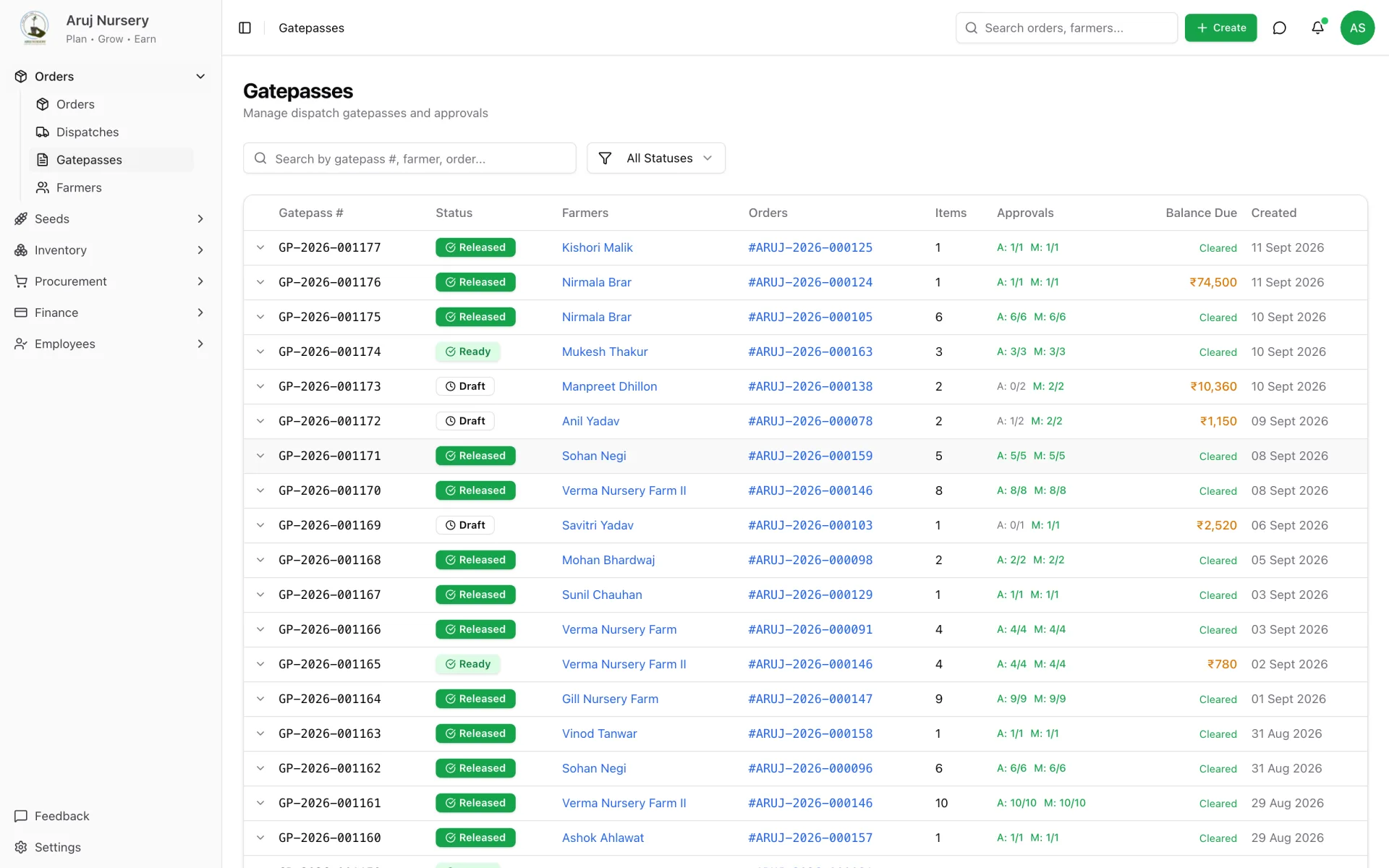
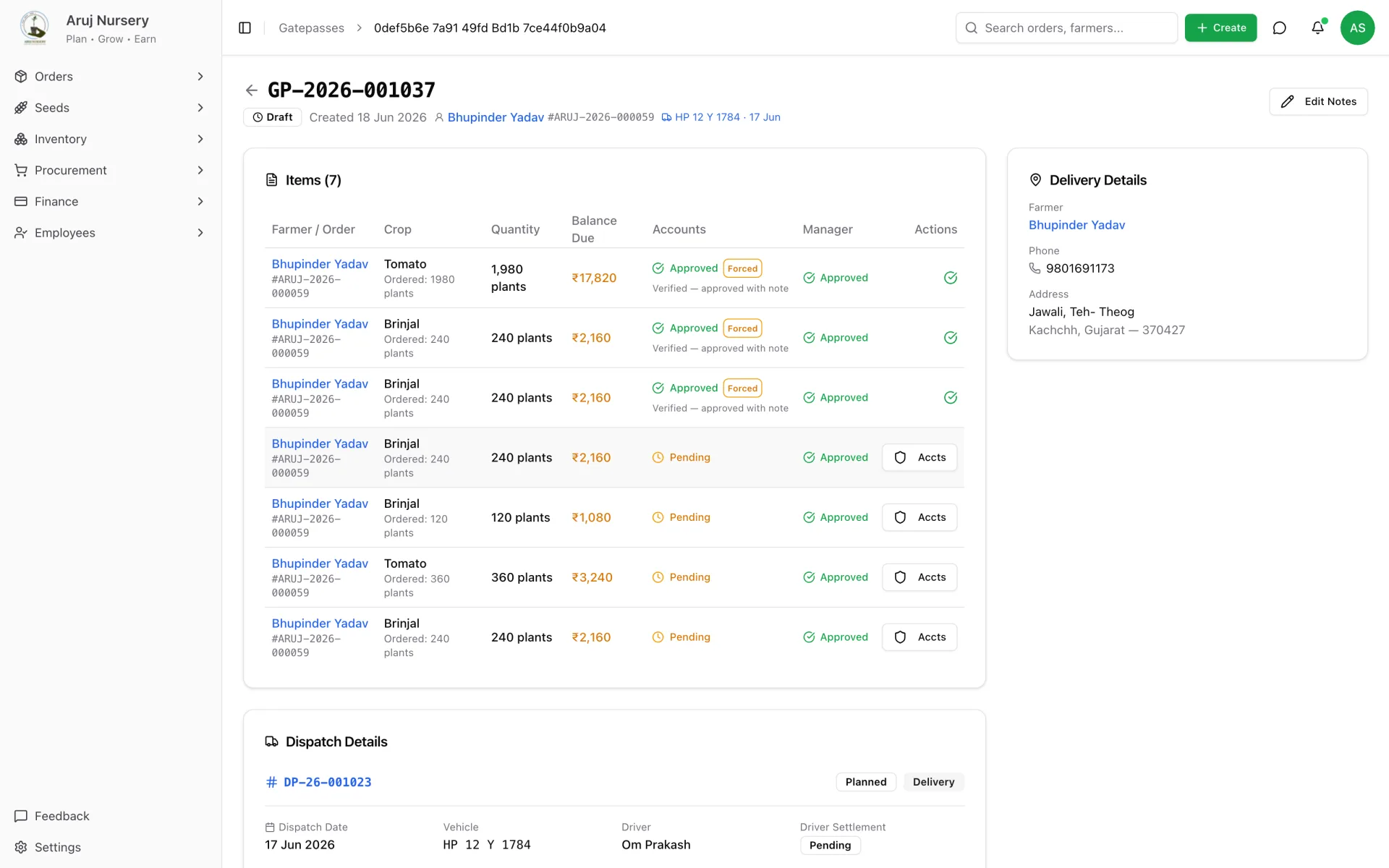
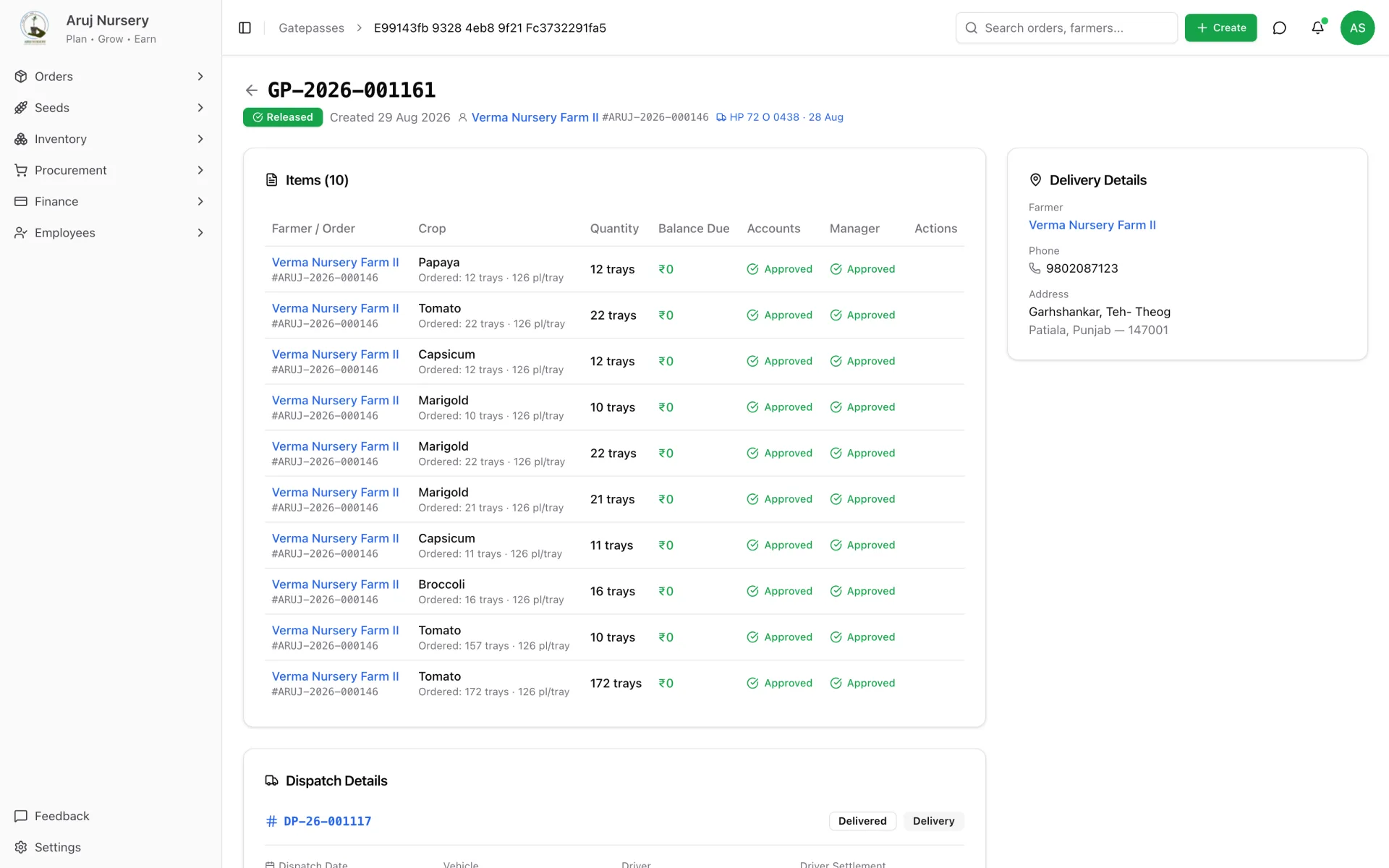
    Two people approve the gate pass, independently.

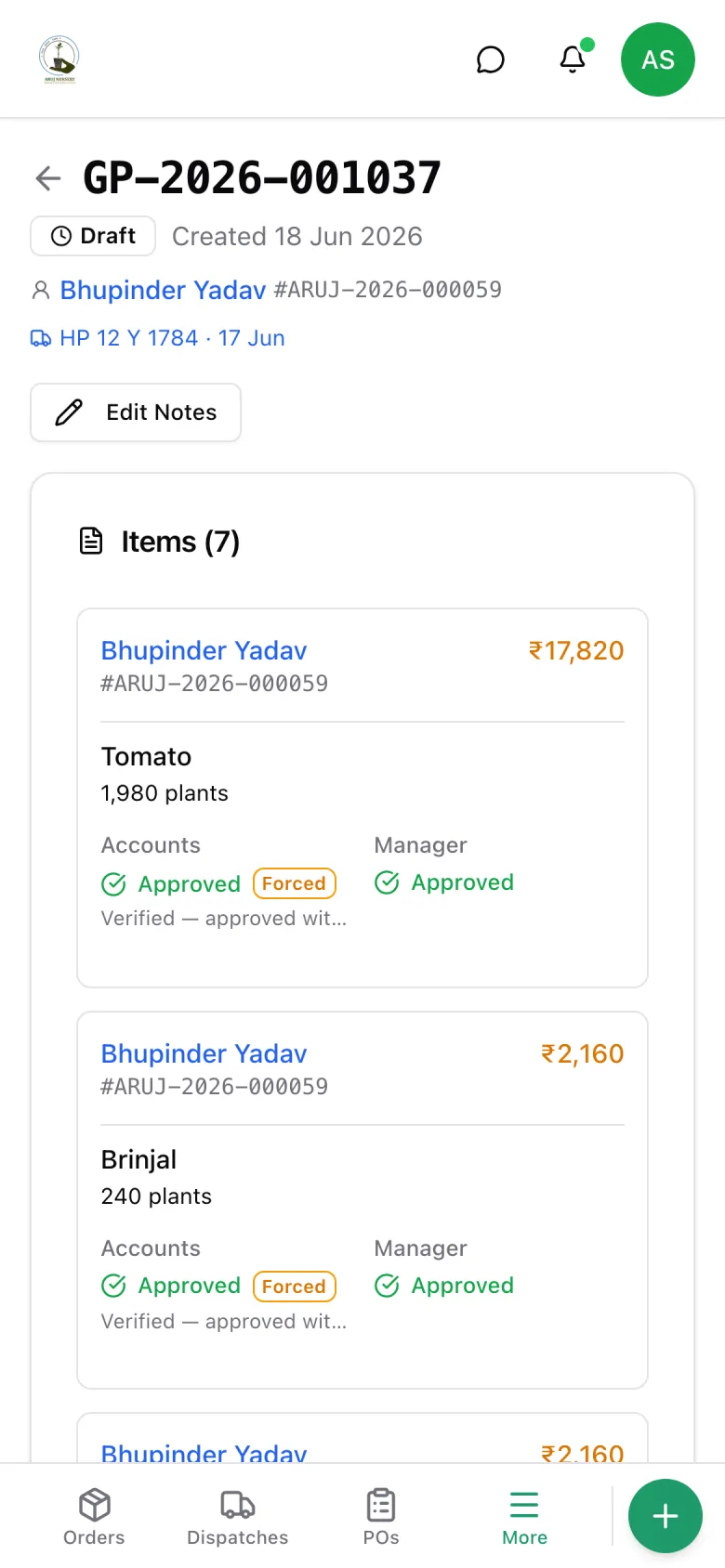
    Accounts checks the live balance per line. The manager checks the plants. If money is still due, accounts must write a note to force it through — visible forever. The pass is ready only when every line has both ticks.

    Gate pass — accounts and manager tracks per line, forced approvals flagged with their note.
    Gate pass — accounts and manager tracks per line, forced approvals flagged with their note.
  6. STEP 06

    Release freezes the order.

    Once the pass is released, the lines on it are locked. Quantities, rates and varieties can no longer be edited without a paper trail. What left the gate is what was invoiced.

    Released gate pass — the snapshot the nursery, the driver and the farmer all agreed to.
    Released gate pass — the snapshot the nursery, the driver and the farmer all agreed to.
  7. STEP 07

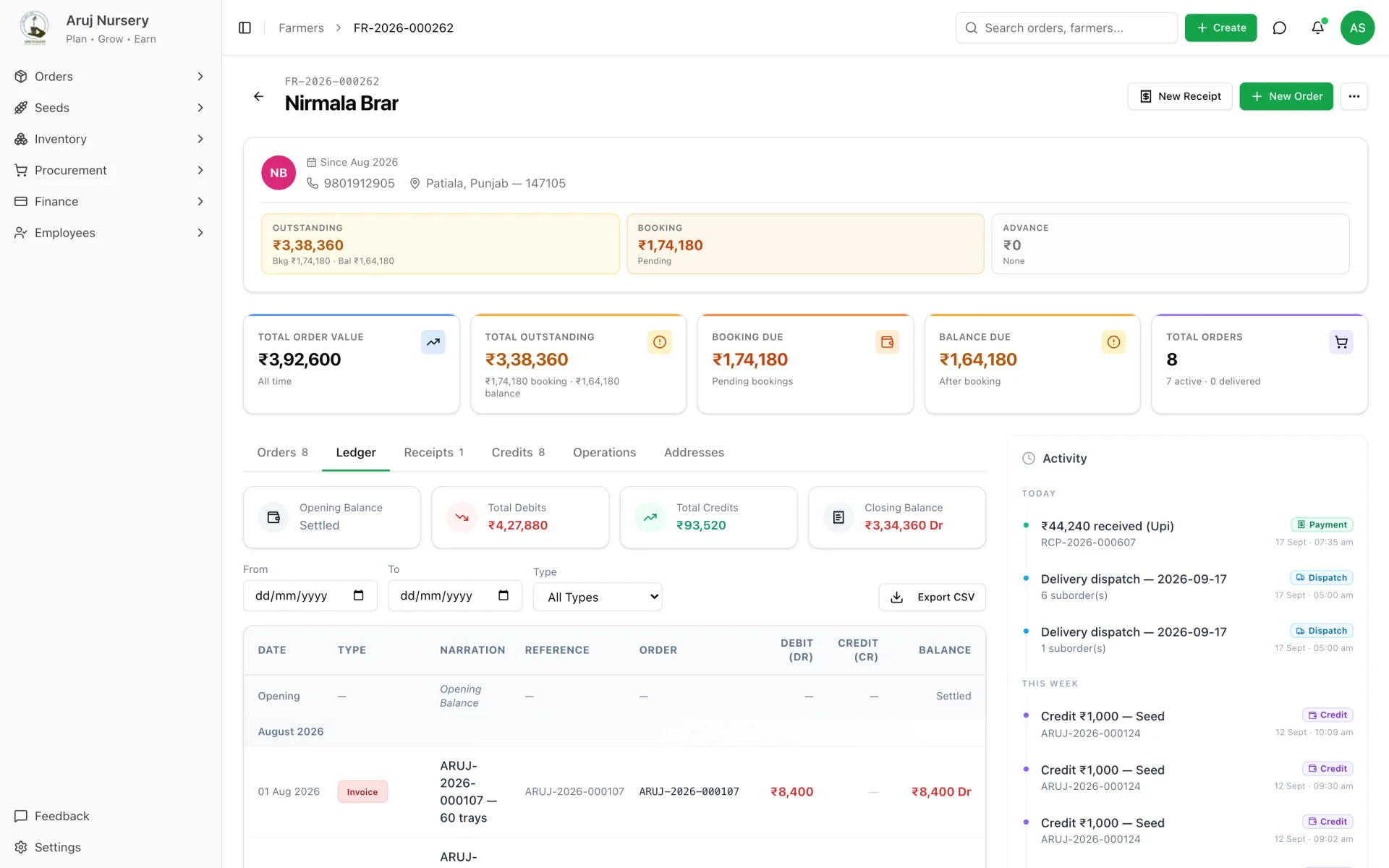
    The farmer's account closes the loop.

    Every invoice, payment, credit, freight charge and refund lands on a ledger the owner can read like a bank statement. Outstanding, booking due and balance due are always current, and the activity timeline shows who did what.

    Farmer account — ledger with running balance, outstanding by bucket, and the activity timeline.
    Farmer account — ledger with running balance, outstanding by bucket, and the activity timeline.
The whole system

Eight modules, one database, no re-keying.

Each team opens the app to the part they own. Behind the screens, everything shares one set of records — so an order booked by sales is the same order finance reconciles and the gate releases.

01 · Orders & farmer CRM

Every farmer, every order, every amendment.

Grafted, non-grafted and job-work orders each follow their own rules. Edits are versioned, cancellations create the right financial adjustment, and a farmer's profile holds their addresses, orders, ledger and history.

  • Three order types with their own validation — grafted lines must carry a rootstock
  • Amendment history: every quantity, rate or variety change is kept with old and new values
  • Pincode lookup fills district and state; post-office suggestions for the address line
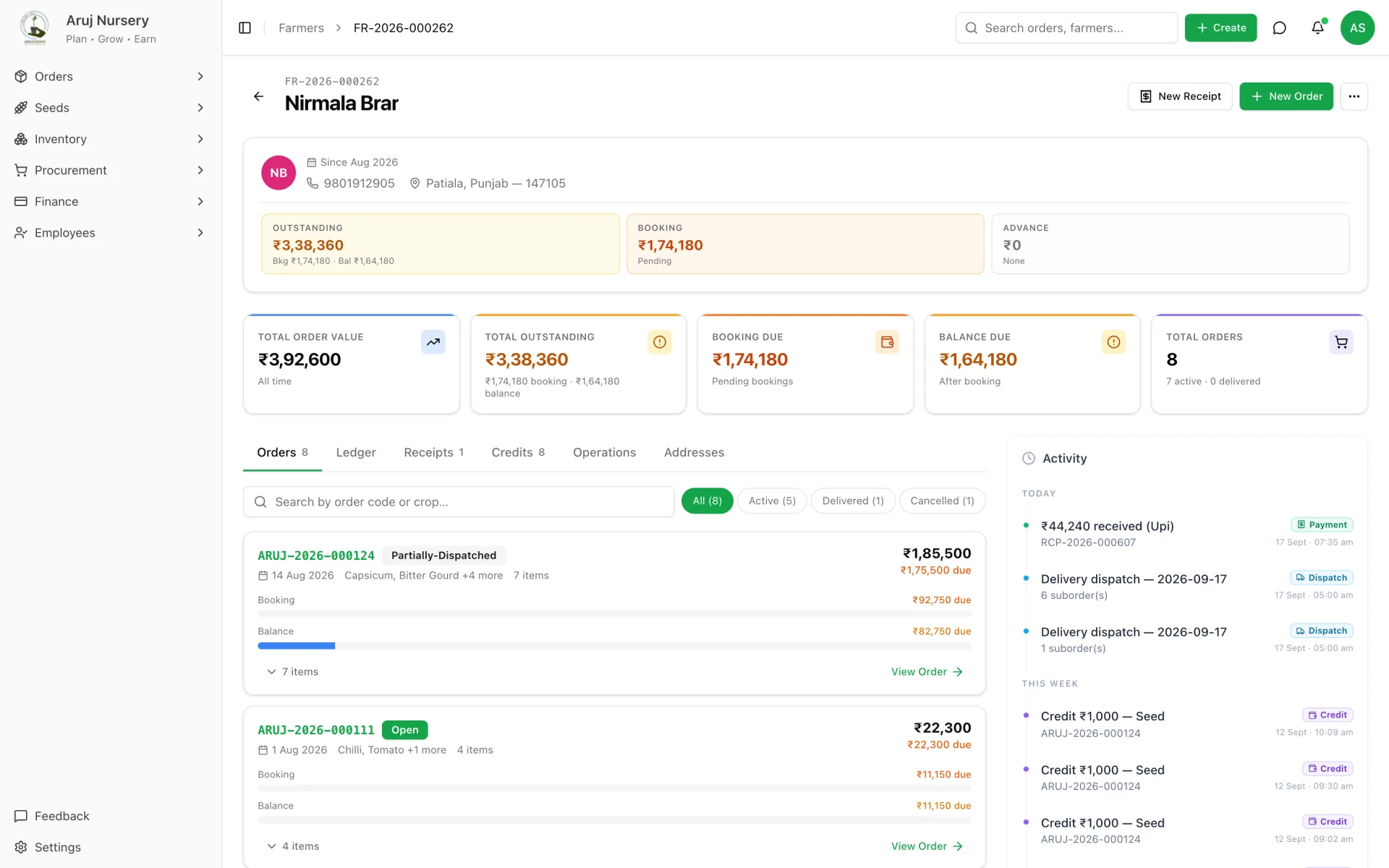
Farmer profile — outstanding, booking due, balance due, orders, receipts and credits at a glance.
02 · Dispatch & gate passes

Trips, freight, crates and a gate that checks the money.

Partial dispatch is normal — a 5,000-plant line can leave over three trips. Each trip mints its own gate-pass lines, tracks crates out and back, and settles the driver, with the nursery able to withhold against unreturned crates.

  • Two-track approval: accounts verifies balances, the manager verifies plants
  • Snapshot staleness — a payment after approval re-opens verification before release
  • Delivery claims with photo evidence, resolved as refund, replacement or credit
Gate passes — per-line progress on both approval tracks, at a glance.
03 · Receipts, credits & ledger

Money that reconciles itself.

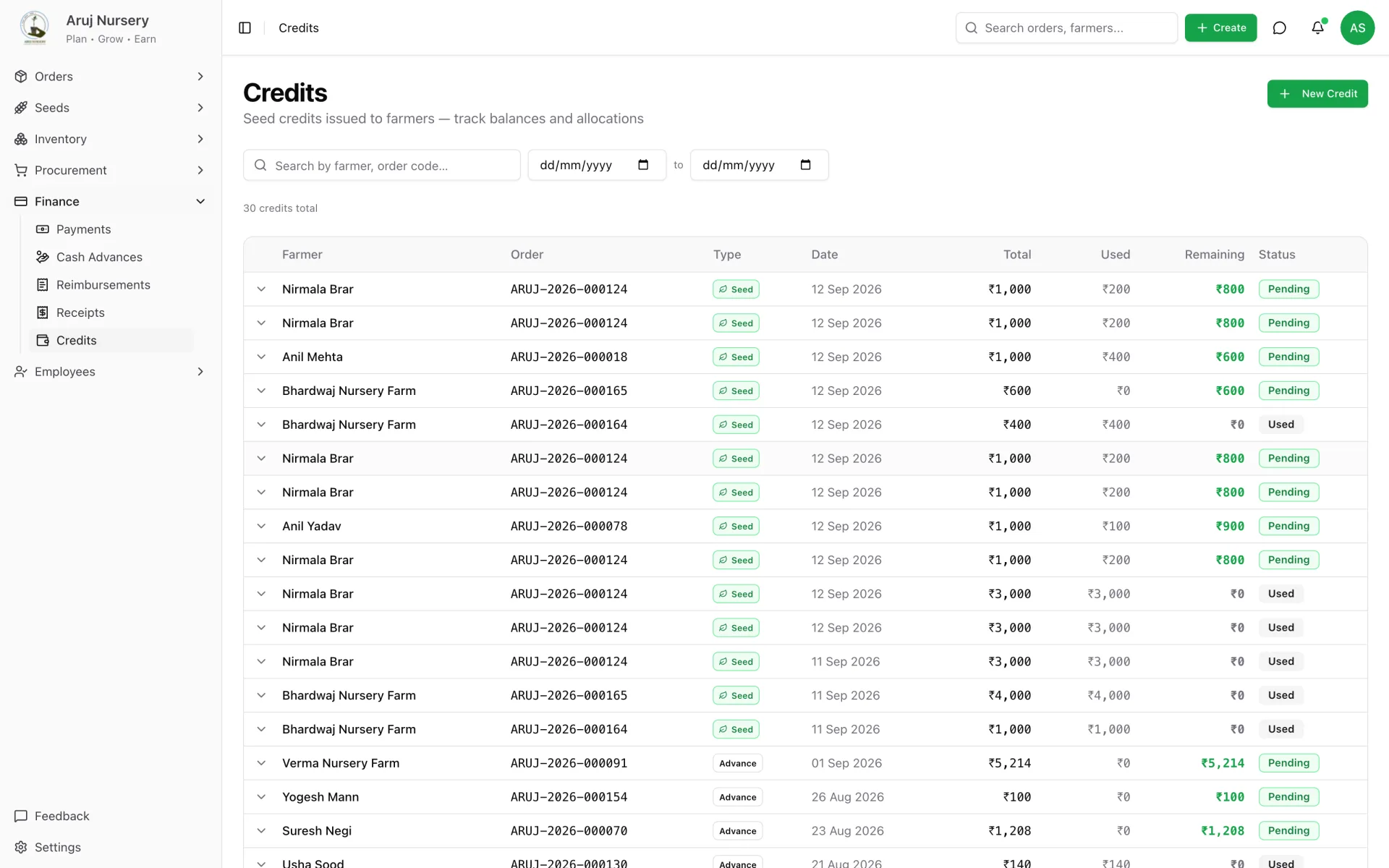
Receipts allocate booking-first across a farmer's open lines. Credits — seed, material, transport, discount — are applied and unapplied with a full trail. Outgoing payments, cash advances and partner reimbursements are on the same ledger as income.

  • Payment status is derived from allocations, never typed in — it cannot drift
  • Any over-payment becomes a credit automatically; nothing is silently absorbed
  • Farmer ledger exportable to CSV; eleven entry types, one running balance
Credits register — issued, applied, remaining, and where each rupee went.
04 · Seed inventory & traceability

From packet to tray to order, and back.

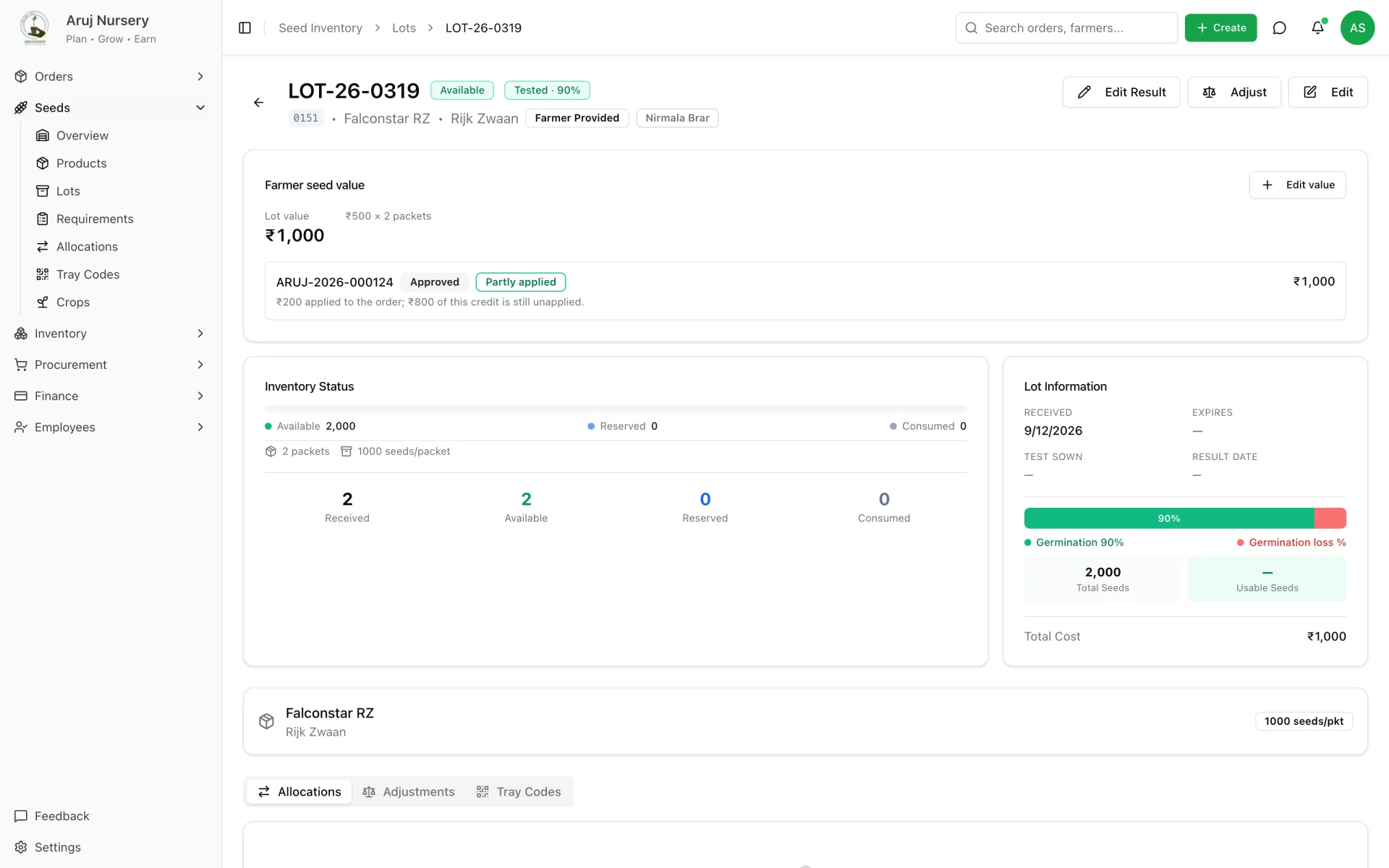
Lots are received in packets and worked in seeds. Requirements derive from orders, allocations reserve stock, germination tests gate issuance, and tray codes trace a physical tray back to its lot, sowing date and order.

  • Germination is a gate, not a multiplier: untested seed cannot be issued
  • Farmer-supplied seed is stock immediately; it becomes money only when finance approves the value
  • QR tray-code lookup for anyone standing in the polyhouse
Seed lot — germination result, availability, farmer-provided value and its approval state.
05 · Procurement

Purchase orders that know what actually arrived.

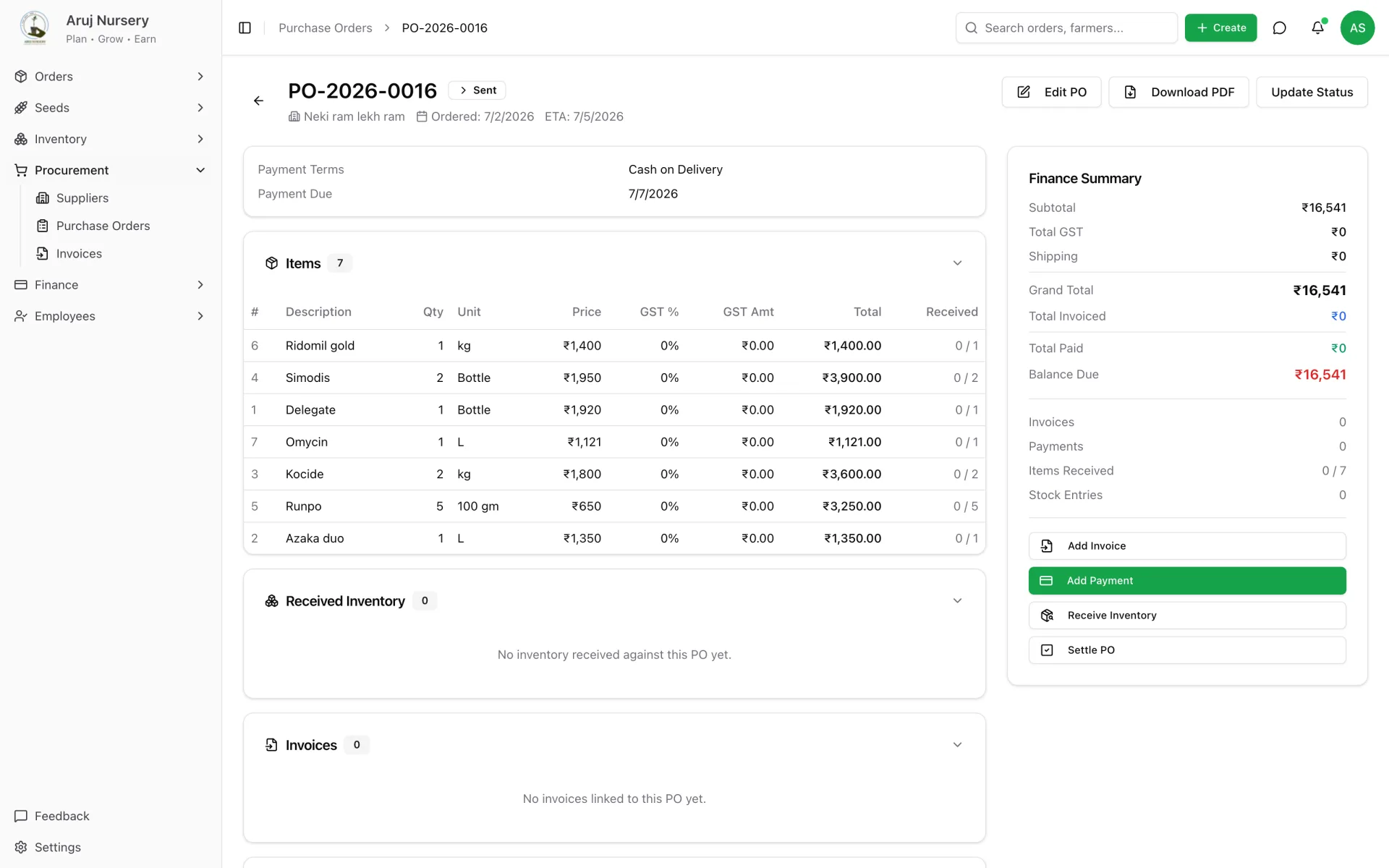
POs can mix seed and general inventory lines. Receiving creates seed lots and stock entries directly from the PO, the status advances itself, and supplier invoices are matched to what was received — not what was ordered.

  • Ordered vs received vs lots created, reconciled per line
  • Supplier invoices: pending, verified, disputed, paid
  • PDF purchase order generated on the server for the supplier
Purchase order — seven lines, finance summary, invoices and payments on one screen.
06 · General inventory

Chemicals, trays, media — counted once.

Stock-in entries with batch numbers and expiry, usage linked to the dispatch or order that consumed it, reorder levels that light up the dashboard. Deleting stock is an admin-only act, on purpose.

  • Ten categories; consumables, durables and fixed assets
  • Low-stock tile on the home screen from real reorder levels
  • Edit history on every stock entry
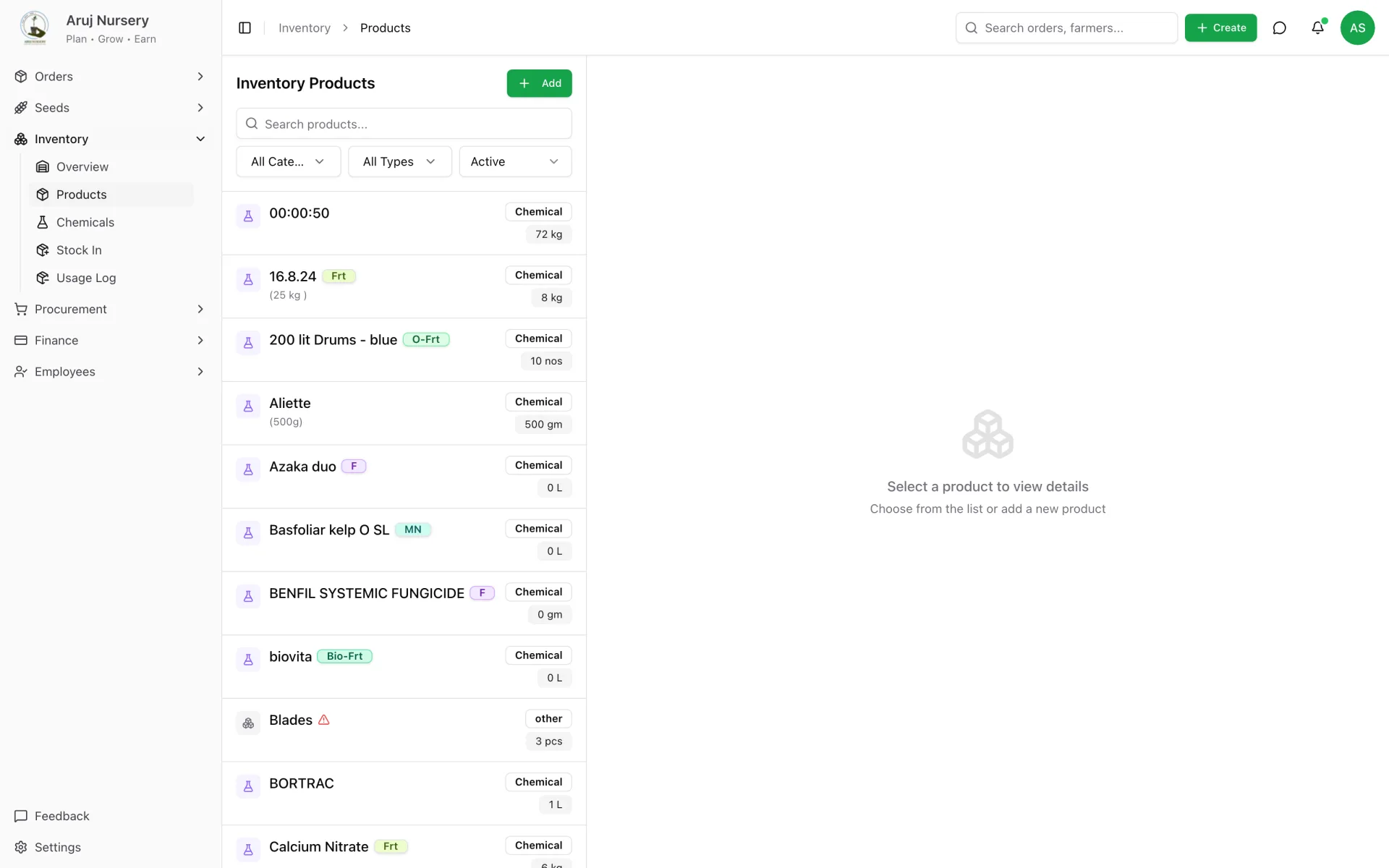
Inventory — current stock, reorder levels and the items below them.
07 · Employees & daily logs

A day's work, logged in a minute.

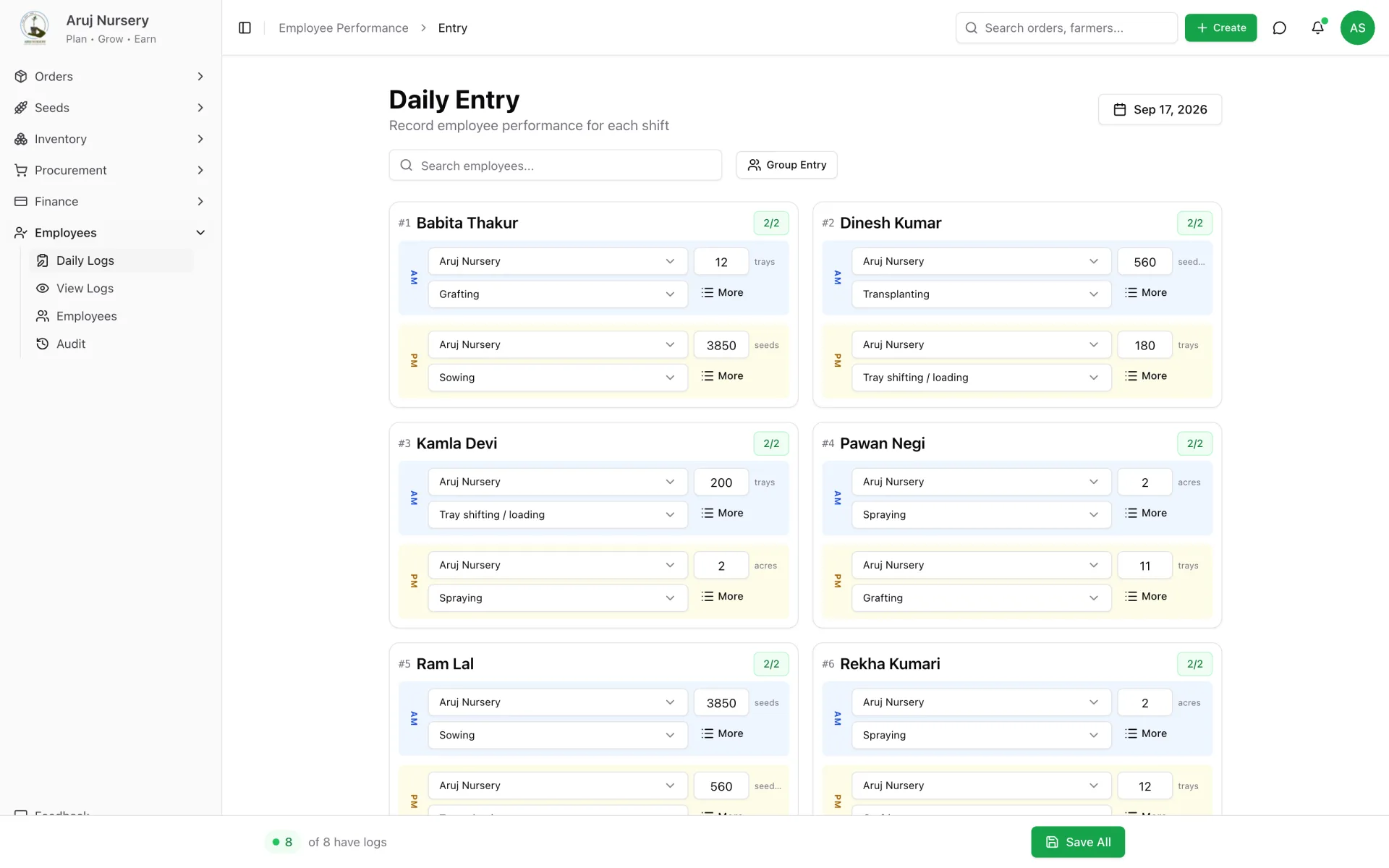
Supervisors record what each person did in each shift — grafting trays, seeds sown, trays shifted — against daily benchmarks. Logs lock after seven days; unlocking needs a reason and every edit is kept.

  • Group entry sheet for the whole team in one screen
  • Absences, overtime and photos on the same record
  • Field-level edit audit with unlock reasons
Daily entry — one sheet for the whole team, morning and afternoon.
08 · The daily report

At 8 pm the owner's phone buzzes.

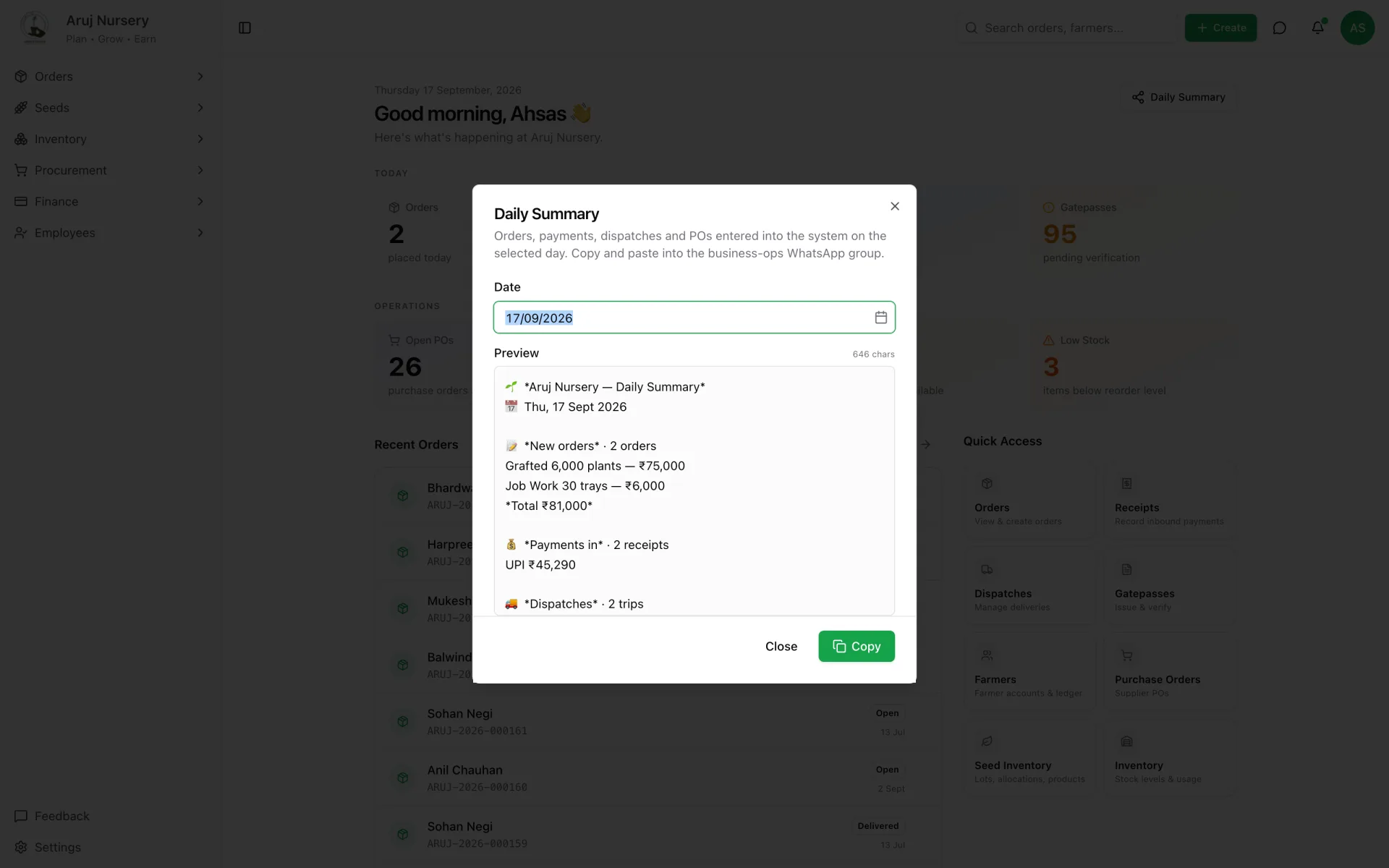
New orders by type, payments by method, trips and plants dispatched, purchase orders raised, and the whole order book by stage — as a WhatsApp message with a link to a shareable page. Nobody has to remember to send it.

  • Sent automatically through the WhatsApp Cloud API
  • Public report link works without a login and shows no personal data
  • One-click copy of the same summary from the dashboard, any day
Daily summary — the WhatsApp-ready text, generated from the day's records.
Mistakes it refuses to make

The expensive errors are now impossible, not just discouraged.

Most of the value of a system like this is in what it will not let happen. These rules live in the database, so they hold no matter which screen — or which person — is involved.

  • No gate pass while money is due

    Unless accounts signs a note saying why. The note stays on the pass forever.

  • Released means frozen

    Once plants leave the gate, the lines on that pass cannot be edited.

  • Untested seed cannot be issued

    A germination result must be recorded by a person before allocation is confirmed.

  • Receipts never over-allocate

    Booking first, earliest delivery first; anything left becomes a credit automatically.

  • Every order edit is versioned

    Quantity, rate, variety and cancellation changes keep old and new values.

  • Daily logs lock after 7 days

    Unlocking needs a written reason; each field change is recorded.

  • Farmer seed is stock, not yet money

    The lot is real inventory at once; a credit exists only when finance approves the value.

  • Deleting stock is admin-only

    Because it rewrites balances. Operations can add and adjust, not erase.

Built around people, not features

Four roles. Each opens the app to exactly what they own.

Permissions are written down as resource-and-action rules, applied in the interface and enforced on every endpoint that moves money.

The floor

Operations

Opens the app to
Farmers, orders, dispatches, the manager side of gate passes, seed and inventory, purchase orders.
By design, cannot
Cannot write receipts or credits, cannot approve the accounts track, cannot delete stock.
The money

Finance

Opens the app to
Receipts, credits, seed-value approvals, payments out, and the accounts track of every gate pass.
By design, cannot
Read-only on orders and dispatch. Cannot create an order or plan a trip.
Admin minus money

Admin (Operations)

Opens the app to
Everything operations can, plus settings, pricing, employees and the audit log. Reads every finance screen.
By design, cannot
Cannot write money or manage users — investigates, does not settle.
The owner

Administrator

Opens the app to
Everything, including user management and role assignment.
8 pm, every day

The owner reads the day from a WhatsApp message.

A scheduled job builds the day's summary from the records, sends it through the WhatsApp Cloud API with a link, and stores the snapshot. The link opens a clean page with no login and no personal data — safe to forward to a partner or an accountant.

  • ▲ scheduled at 20:00 IST, every day
  • ▲ built from the day's records, not typed by anyone
  • ▲ link opens without a login, shows no personal data
Aruj Nursery · Ops
business account
🌱 Aruj Nursery — Daily Summary
📅 Thu, 17 Sept 2026

💰 Payments in · 2 receipts
UPI ₹45,290

🚚 Dispatches · 2 trips
3,000 plants + 326 trays

📗 Order book
Grafted · 2,10,694 plants
Nursery 25,130 · Transit 1,06,772 · Delivered 78,792
8:00 pm
View full report ↗
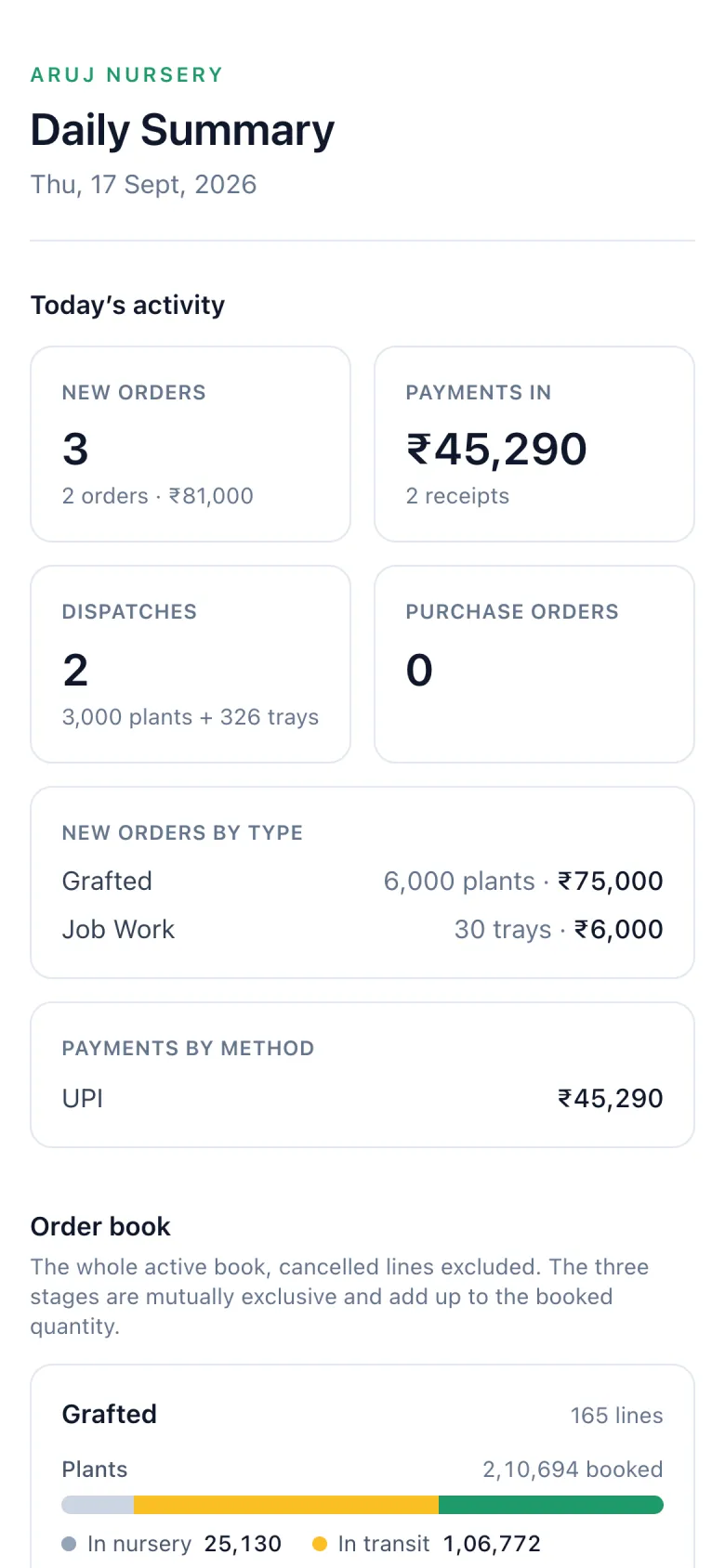
The public daily report page on a phone — today's activity and the full order book by stage.

The message · the page it links to

In the field

Works on the phone in the polyhouse, not just the laptop in the office.

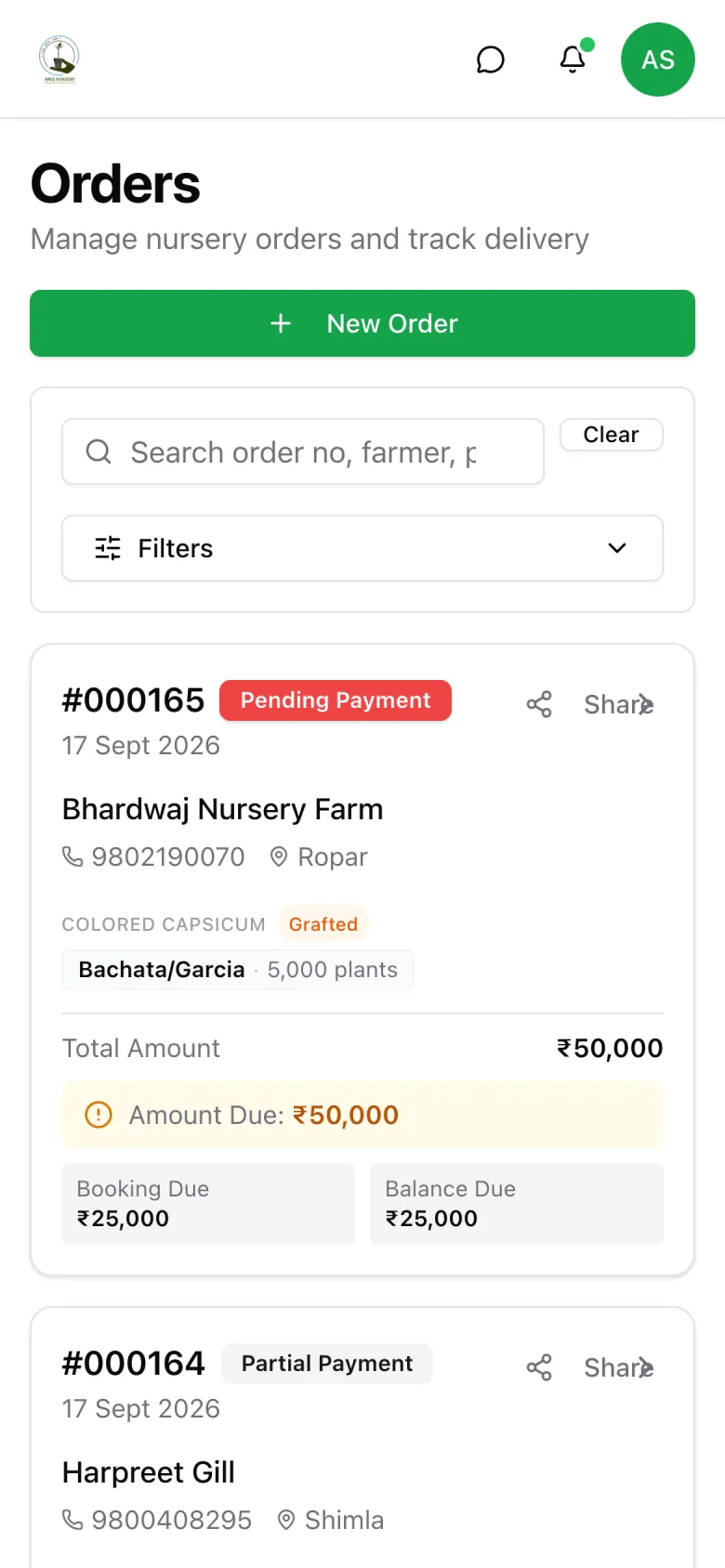
Supervisors approve gate passes standing at the gate. Sales books an order from a farmer's field. The bottom bar puts orders, dispatches and purchase orders one tap away, with a quick-create button for the rest.

Orders on a phone — search, filter and open any order
Orders on a phone
Gate pass approval on a phone — accounts and manager ticks per line
Gate pass approval on a phone
Dispatch on a phone — trip, freight and crates
Dispatch on a phone
How it was delivered

Ten months, one engineer, in production from month six.

No six-month dark room. The first version went live while the later modules were still being designed, and every release since has shipped to the same production system the nursery was already using.

  • ▲ two-week ship cycles
  • ▲ weekly written progress
  • ▲ client owns repo, database and hosting
  1. Nov 2025

    Discovery and data model

    Walked the nursery's actual process — orders, sowing, grafting, dispatch, collections. Designed the schema around how money and plants really move.

  2. Feb – Apr 2026

    Core build

    Orders, farmers, dispatch and gate passes, seed inventory, procurement. First orders entered in April.

  3. 10 May 2026

    v1.0 in production

    Operations moved onto the system. Sales, dispatch and the gate stopped using the sheets.

  4. Jun – Jul 2026

    Hardening

    Two releases from real usage: edit flows, partial dispatch, crate tracking, claims.

  5. Aug – Sep 2026

    Finance, people and the daily report

    Ledger reconciler, credits, payments out, employee logs, the 8 pm WhatsApp summary, farmer-seed valuation. Four releases in six weeks.

By the numbers

What it took to build.

Measured from the repository on 12 September 2026. Lines of code include the SQL that carries the business rules.

56
Screens
154
API endpoints
60
Database tables
117
SQL functions
93
Versioned migrations
9
Production releases
684
Commits
10
Months, one engineer
4
Roles
165k
Lines of code
Commits per month · Nov 2025 – Sep 2026January was a planned pause. The busiest month was the tenth.
NovDecJanFebMarAprMayJunJulAugSep139
For your IT person

How it's built.

Application
Next.js 16React 19TypeScriptReact QueryZodTailwindshadcn/ui
Data
SupabasePostgresSQL functions & viewsRow-level typing
Operations
VercelGitHub ActionsSentryWhatsApp Cloud APIPDF generation
  1. 01Next.js 16 on Vercel, TypeScript strict throughout, Supabase Postgres. The client owns the repository, the database and the hosting accounts.
  2. 02Layered: pages → API routes → typed hooks → database. Components never touch the database directly; every write goes through one server-side path.
  3. 03Business rules live in Postgres — 117 SQL functions, 100+ triggers and 25 views — so allocation, gate-pass readiness and ledger posting hold regardless of which screen is used.
  4. 04Four roles defined as resource-and-action permissions, applied in the UI and enforced on every money-critical endpoint. A fail-closed authentication gate on the whole API.
  5. 0593 versioned migrations promoted local → staging → production, with a one-command schema check. Conventional commits, lint and typecheck on every push, build on every release.
  6. 06Audit story end to end: order events, amendment history, a field-level edit log, and an immutable snapshot on every released gate pass.
In their words

A written quote from Aruj Nursery is being collected. Until it lands, a reference call with the owner is available to any serious prospect — ask on the fit call.

▲ no invented testimonials on this site, ever

Straight answers

The questions you’re actually asking.

  • No. The shape is generic: customers who book and pay in stages, stock that has to be reserved before it is sold, vehicles that leave with goods, and a gate where money and goods should agree. Wholesale distribution, manufacturing, rentals and clinics have the same bones. The crop vocabulary is the thin layer on top.

Last thing

Have a business that runs on sheets and memory?

25 minutes. No slides. You walk me through how orders actually move through your business today, and I'll tell you what is worth building — or that nothing is.

Pick a time
Open in Cal ↗
Or send a brief

Prefer email? One line about how your business runs today. I'll reply within 4 business hours.

▲ no spam — just a reply from me, nothing you didn't ask for